


In a live caption translate workflow, speech appears as on-screen text in another language. Attendees can follow a multilingual presentation as it happens, though some will still need same-language captions or a spoken interpreter. What you provide depends on how people plan to take part and what an error could cost them.
For a conference, company meeting, worship service, or hybrid broadcast, ask attendees which languages and access formats they need. Find out who expects to ask questions, then choose how to deliver each language feed.
What live translated captions actually do
A live caption translation system first recognizes speech, then translates and displays the text. Mishearing a name or acronym at the start can lead to a misleading translation on screen.
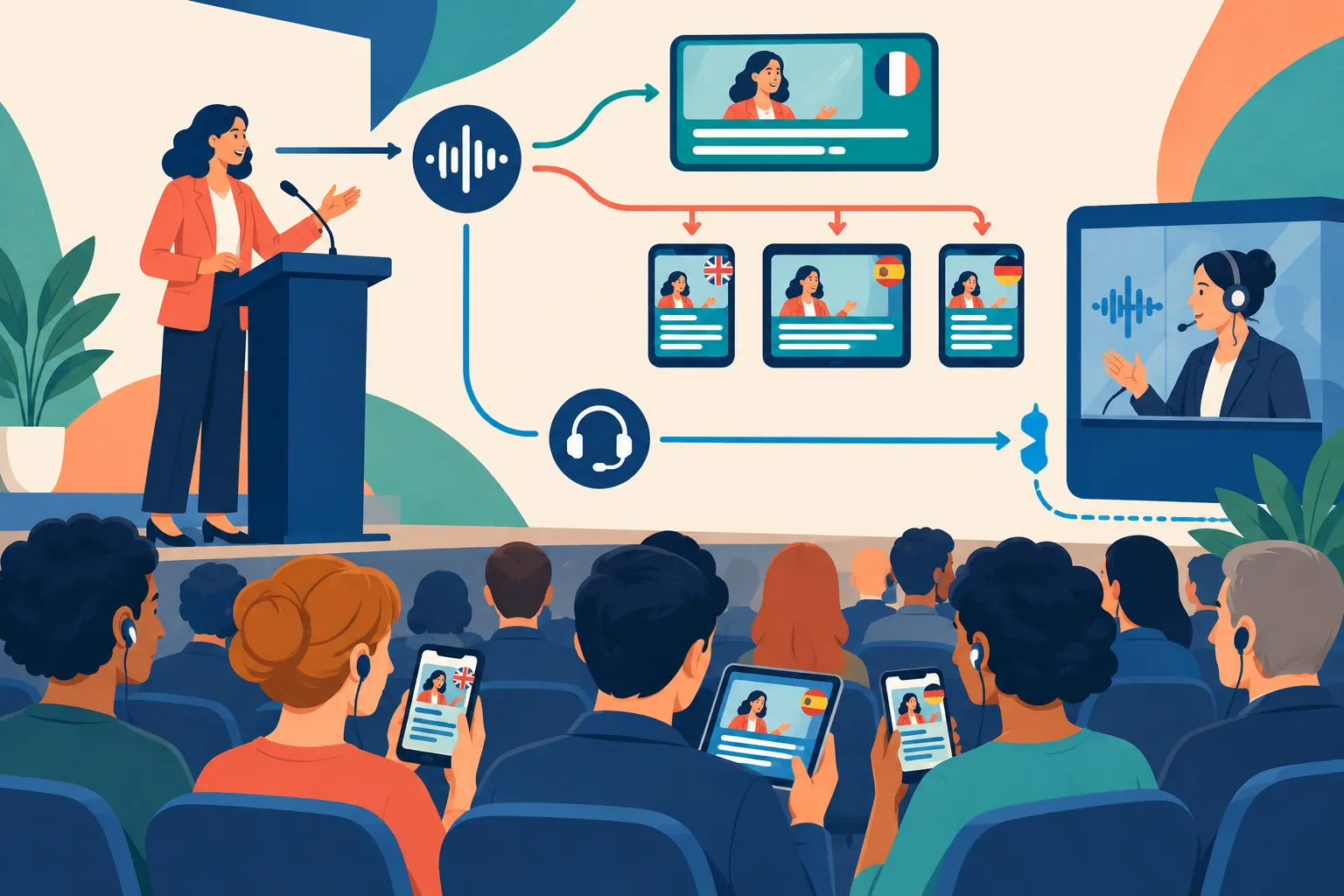
Three services that sound similar meet different needs:
|
Service |
What attendees receive |
Best use |
|---|---|---|
|
Same-language live captions |
Written speech in the language being spoken |
Access for attendees who need or prefer to read the original language |
|
Live translated captions |
Written speech in another language |
Multilingual access for attendees comfortable reading that language |
|
Live interpreting |
Spoken meaning in another language, delivered by an interpreter |
Attendees who need to listen, respond quickly, or follow nuanced exchanges |
A meeting transcript can come later; live captions must reach attendees in time to follow the speaker. Closed captions in the source language can also convey important sound cues. For recorded video content, editors can correct subtitle files before release. A live speaker gives them no such window.
Where translated captions work well
For a keynote or company update with one speaker at a time, live translated captions give attendees a way to read along. The meeting or event system must support the languages they need.
In a fast panel, the translated reply might appear after the discussion has moved on. A sensitive employee meeting, legal briefing, medical discussion, or critical announcement also deserves more than an unreviewed automated feed. One mistranslated instruction could change what attendees do.
|
Event need |
Sensible starting point |
What else to consider |
|---|---|---|
|
Mostly one-way talk, multiple reading languages |
Live translated captions |
Same-language captions and a clear way for attendees to select their language |
|
Fast two-way multilingual discussion |
Live interpreting |
Same-language captions for attendees who need text access |
|
Formal or high-stakes message |
Human-supported interpreting and/or captioning |
Reviewed terminology and a plan for correcting errors |
|
Hybrid program with slides and remote speakers |
Event-specific caption and language delivery |
On-site display, stream integration, audio routing, and technical support |
An attendee who needs to listen requires a spoken audio channel; captions will not provide it. Someone who needs to read spoken content still needs captions, even if you have an interpreter.
Live caption translate tools and managed event services
“Live caption translate” covers captions inside a meeting, a browser tool listening to meeting audio, and feeds produced for an entire event. The organizer’s control over the result varies across those options.

|
Approach |
Typical attendee experience |
Organizer’s main responsibility |
Main limitation |
|---|---|---|---|
|
Built-in meeting captions or translated captions |
Attendee reads text within the meeting interface |
Ensure the intended meeting format and attendee access work |
Feature availability and language choices depend on the platform and account setup |
|
Browser or individual translation tool |
Attendee reads text on their own device |
Make the event audio accessible to that tool |
The organizer has less control over what each attendee sees |
|
Managed event language access |
Attendees use a planned caption display, stream, device, or language channel |
Set requirements and coordinate the provider with production |
Requires advance planning and an event workflow |
Zoom and Microsoft Teams are common choices for virtual meetings, but a caption button does not tell you whether an attendee can read a translation. Meeting type, account permissions, device, and language options affect what appears. For a public webinar or hybrid show, decide where attendees will read the text: in the meeting, on a stream, on a room screen, or on their own devices.
Can one event offer captions in multiple languages?
Yes, if the setup supports the language pairs you need. The speaker’s audio supplies the source language, and the system can let each attendee choose a preferred language. Account for anyone who switches languages mid-session. Bilingual captions show the original and translated text together, so leave enough screen space for both.
If the host cannot change the meeting platform, a browser tool may help an individual follow along. The organizer has less control over the text each person sees. A managed service can coordinate captioning and interpreting with displays, equipment, and technicians, provided the team knows who is attending and what is happening onstage.
Accuracy and accessibility limits that matter
Automated translation depends on what the captioning system hears. Poor microphones and overlapping voices can garble speech; music, accents, jargon, and audience questions add to the challenge. In a debate or workshop, even a short delay can leave a participant reading a reply after the next speaker starts.
“It is more difficult to create accurate real-time captions because there is little time to correct mistakes.” – W3C Web Accessibility Initiative
Send the captioning or interpreting team speaker names, acronyms, slide decks, and a glossary. Presenters should use their microphones and take turns. If a speaker gives critical instructions, have someone watch the feed and know how to correct an error.
People need to be able to read the text you provide. Plan its size, contrast, placement, and display time, as well as any requests for same-language captions, interpreting, or a way to ask questions. Check sightlines in the venue and make sure remote attendees receive the same information.
“Captions are provided for all live audio content in synchronized media.” – W3C WAI, WCAG 2.2 criterion 1.2.4
An automatic translation feed cannot guarantee compliance; requirements depend on the event and its attendees. Invite access requests early, document the arrangements, and deliver the format you promised.
A planning checklist before the event
-
Ask attendees which languages and access formats they need. Note who needs to read, listen, speak, or switch languages.
-
Mark prepared talks, panels, audience questions, and video playback in the program. Flag any point where a mistranslation would cause serious problems.
-
Decide where captions will appear: in the meeting interface, on the stream, on a room display, or on individual devices. Plan the original-language feed separately from translations.
-
Give the language team terminology, presenter names, slides, pronunciation notes, and the run of show.
-
Join a rehearsal on the kind of device attendees will use. Try language selection and check readability, sound routing, speaker handoffs, and the question-and-answer segment.
-
Name the person who will watch the live feed and contact captioners, interpreters, or technicians if something goes wrong.
For a hybrid event, rehearse in the room and online. Text that looks fine on a laptop may be too small on a venue screen, and the room interpreter’s audio needs a route to virtual attendees.
Choose the mix of services that fits the room
For a low-risk internal meeting, built-in translated captions may do the job if every attendee can use them. A staged event with a livestream, several languages, and access requests calls for a captioning and interpreting plan. People may read translated text during one session and listen to an interpreter in another.
Team Stream provides captioning, interpreting, translation, equipment, and technician services for live, virtual, and hybrid programs. Planners can combine its human and AI-enabled services to meet the event’s needs. That involves a brief and a rehearsal, unlike asking attendees to turn on a feature.
Live translated captions work when attendees can follow the program by reading another language. Add human support where accuracy, participation, or access calls for it. For a program with several delivery channels or languages, ask Team Stream to plan how each attendee will follow it.
FAQ
Is there a free real-time AI translator available?
Some meeting and browser tools offer automatic speech translation, but access to a particular translated-caption feature depends on the product and account. For an event, free access for one user is not the same as an organizer-provided caption feed that every attendee can use. Choose based on the languages, display method, and accuracy needs of the audience.
What is the best real-time translator?
There is no single best option for every event. A built-in meeting feature may suit a small presentation; a managed captioning and interpreting setup suits programs that need multiple delivery channels or human support. Decide first whether attendees need translated text, spoken interpreting, same-language captions, or a combination.
