

For event interpretation services, settle the language plan while you build the agenda. Identify who needs which language in each session, whether they will attend in person or online, how they will hear the interpreter, and who will manage the audio on show day. Give the language and production teams the same brief.
This equipment demonstration shows one way listeners can receive a separate interpreted audio feed:
Start with a session-by-session brief
Your keynote, breakouts, Q&A, reception, and livestream may each need a different setup. Start with sessions where participants must understand or respond in real time, then map the audience and format for each.
|
Decision |
What to record |
Why it changes the setup |
|---|---|---|
|
Session and timing |
Start, end, breaks, and any overlapping sessions |
Interpreters and channels must be available where the program actually runs. |
|
Languages |
Spoken language on stage and languages attendees need to hear |
A multilingual panel may need a different plan from a single-language keynote. |
|
Audience location |
Room, remote, or both |
In-room listeners and virtual participants receive interpreted audio in different ways. |
|
Participation |
Presentations only, moderated Q&A, or open discussion |
An interpreter may need a way to hear questions before they can relay answers. |
|
Delivery and access |
Headsets, event platform, captions, or other access needs |
Language audio and accessible text should be designed together. |
Ask registrants what language they need and how they will join. Count remote employees for a corporate town hall, people in the room and on the stream for a church gathering, and participants by track for a conference. A list of languages on the invitation will not tell you which session needs which feed.
Choose how each session will be interpreted
Simultaneous interpreting (also called simultaneous interpretation) delivers speech while the presenter continues talking. It fits keynotes, panels, worship services, and other time-bound programming where stopping after every statement would disrupt the schedule. Listeners select a language audio feed, typically through room listening equipment or an online event platform.
Consecutive interpreting (consecutive interpretation) lets the speaker pause while the interpreter relays a segment. It can work for a short interview, a small meeting, or a controlled Q&A. Build the pauses into the agenda; the conversation will take longer than the same exchange without interpretation.
|
If the session is… |
Usually plan for… |
Production implication |
|---|---|---|
|
A continuous keynote or panel |
Simultaneous interpreting |
Provide a clear speaker feed and a separate listening path for each requested language. |
|
A short, turn-based exchange |
Consecutive interpreting |
Give the moderator a speaking-and-pausing protocol. |
|
A hybrid discussion with questions from both audiences |
A mode chosen for the session pace, plus two-way audio routing |
Make remote and room questions audible to the interpreter before testing audience playback. |
Use the session format to make the final choice. A fast-moving panel needs tighter microphone discipline than a scripted presentation. Ask how the provider will handle interpreter coverage, breaks, and handoffs across the schedule, especially during long sessions.
Plan event interpretation services across venues and screens
At an in-person event, establish how the interpreter hears the floor audio and how listeners receive each language, including in breakouts. An interpreter working remotely can serve the venue if the AV team sends clean audio out and brings the interpreted feed back.
For a virtual event, identify the platform’s language-audio options before promising multilingual access. At a hybrid event, test language selection online and listening equipment in the room as separate paths. Make sure the interpreter hears speakers and questions from both locations.
What is remote simultaneous interpretation (RSI)?
With RSI, interpreters work from another location. They listen to the event and deliver live language audio back to participants. The AV team still needs to provide a dependable floor feed, route the language channels, and rehearse. Agree on when the producer will pause the session if the remote connection fails.
Map interpretation, captions, and AV together
An interpreted feed gives listeners speech in another language; captions put speech into text. Some attendees need both, including captions in the original language while listening to interpretation. American Sign Language (ASL) interpreters need their own sightline or video placement and camera framing. Spoken-language interpreters cannot fill that role.
“Some people want both sign language and captions. Not everyone who is deaf knows sign language.” – W3C Web Accessibility Initiative
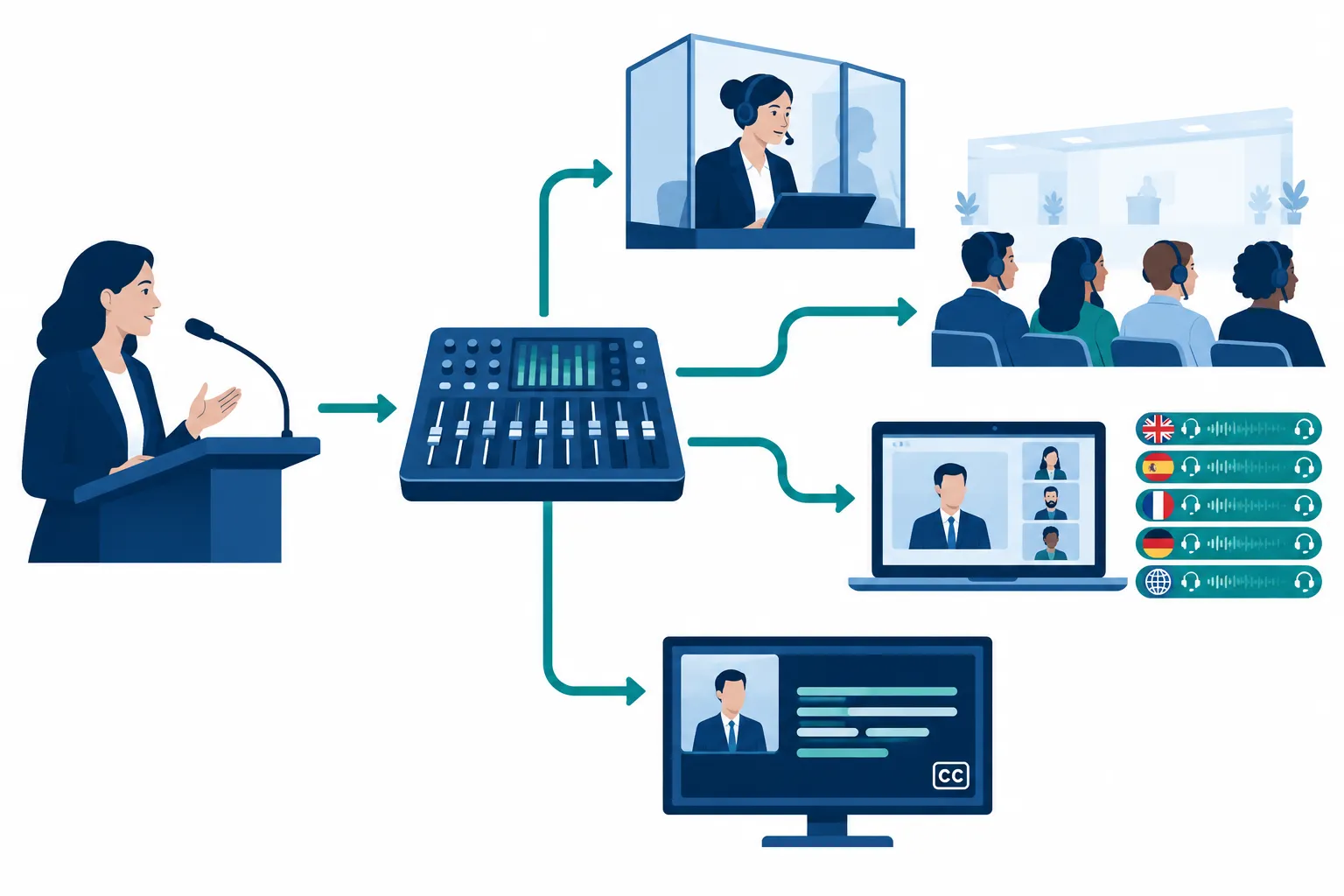
Before booking, draw a simple signal path with the AV lead:
-
Input: microphones for presenters, panelists, room questions, and remote callers.
-
Interpreter feed: the audio and any visual context the interpreter needs, including video played during the session.
-
Output: separate language feeds to room listeners, online participants, and any recording that needs them.
-
Text access: the source audio for live captions and where captions appear in the venue, stream, or recording.
Send prerecorded clips to the interpreter and captioner as well as to the main sound system. Include the clips, terminology-heavy slides, and audience-mic locations in the technical advance. During rehearsal, test every microphone all the way through to the listener and caption outputs.
Keep automation in the right role
Choose AI-enabled language tools according to the audience, the consequences of an error, and how far speakers may depart from a script. Sensitive or interactive sessions call for professional human interpreting and a way to resolve unfamiliar terms before the event. If you use automated captions or translated text, assign someone to monitor the output and correct errors during the show.
Build interpretation into the run of show
Send interpreters the agenda, speaker names, available scripts and slides, specialized terms, pronunciation notes, video assets, and Q&A format ahead of time. When the program changes, send the language team one updated version rather than several conflicting files.
If participants must read slides, signs, or handouts across languages, scope document translation separately from live interpretation. Event planners should also tell the language services team whether translated assets need to appear in a room, on a stream, or in a post-event recording.
|
Moment |
Producer action |
Language and AV handoff |
|---|---|---|
|
Before doors open |
Walk through agenda, speaker changes, and language selections |
Test each microphone, interpreter feed, listener channel, caption display, and remote return audio. |
|
Session start |
Tell participants how to select audio or captions |
Cue the interpreter and ensure the correct floor feed is live. |
|
Speaker or room change |
Announce changes through the show caller |
Switch the relevant feed and confirm the interpreter can hear the new speaker. |
|
Audience Q&A |
Direct participants to a mic or moderated remote question path |
Give the interpreter the full question before the answer begins. |
|
Technical interruption |
Pause or hold the session as needed |
Restore the missing feed, then clearly cue the restart. |
Rehearse a presenter joining from home, a panelist taking an audience question, a video insert, and the move from plenary to breakouts. Give a technician or AV owner authority to call for a pause if a language channel drops. Moderators should keep speakers on mic and stop people from talking over one another so the interpreter can convey each question.
Send a booking brief that can actually be scoped
Give the interpretation provider the same current brief you give the show producer:
-
Event dates, time zone, venue or platform, rehearsal window, and the current run of show.
-
Session-by-session language needs, including the language speakers will use and the languages participants will select.
-
Estimated audience by room and online channel, plus the rooms or sessions running at the same time.
-
Preferred interpretation mode where known, and a description of the speaking pace and Q&A.
-
Existing microphones, mixer, platform language features, listening equipment, captioning setup, and the AV contact.
-
Whether the event will be recorded or broadcast, and which audio and caption outputs the final version needs.
-
Accessibility requests, scripts, slide decks, terminology, and any videos that will play.
Ask the provider to name who supplies equipment, configures language channels, operates the feeds, and helps participants find their language. Otherwise, you could have interpreters booked with no one responsible for getting their audio to the audience.
Final decision: book the workflow, not just the interpreter
A small meeting may need only a clear consecutive plan. A multilingual conference or hybrid broadcast needs the audio system, event platform, captions, rehearsal, and show crew working from the same language plan. Team Stream can coordinate professional interpreting with captioning, equipment, and technician support for live, virtual, and hybrid events. Send its team your session-level brief early so they can plan language access with the rest of the production.
