

FCC caption quality standards for live broadcasts give your team four things to inspect: accuracy, synchronicity, completeness and placement. Text in the encoder preview is only the starting point. Watch the program as a viewer receives it, through transitions and graphics, and assign someone to handle each kind of failure.
These standards govern captioned television programming, including live and near-live shows. Corporate webinars and private events are outside these particular TV rules unless their distribution brings them within the covered categories. The same production checks are useful there: captions need to carry the audio’s meaning, arrive with it, continue through the program and stay clear of vital on-screen information.
Where the FCC’s television caption rules apply
The FCC’s television rules in 47 CFR § 79.1 address video programming distributed for residential viewing through television broadcasters and other covered video programming distributors and programmers. The regulation defines live programming as programming shown on television substantially simultaneously with its performance. Near-live programming is performed and recorded less than 24 hours before its first television airing. The rules distinguish these from prerecorded programming because live captioning has different constraints.
A livestream destination alone cannot tell you which rule applies. A simultaneous TV broadcast needs a working broadcast caption path. An online-only town hall, corporate conference or webinar needs a caption plan suited to its audience and platform, without being classified as a TV broadcast by default. TV programming delivered over the internet can involve separate captioning requirements. Map each outlet and caption path before a program goes to both TV and internet distribution.
The FCC recognizes exemptions for some television programming and providers. An exemption is not a reason to assume a particular live broadcast can go without captions.
The four caption quality standards, turned into feed checks
Use this table during a rehearsal and again on the outgoing feed. The left column reflects the FCC’s quality dimensions; the checks are a practical way for a producer to spot problems, not numerical pass/fail thresholds set by the agency.
“Captioning shall be accurate, synchronous, complete, and appropriately placed as those terms are defined herein.” – Federal Communications Commission, Closed Captioning Quality Report and Order
|
Standard |
What viewers need |
What to check live |
Who should respond |
|---|---|---|---|
|
Accuracy |
Dialogue and meaningful sounds conveyed as fully as possible |
Listen for names, numbers, speaker changes and important sound cues while reading captions |
Captioner for word choice; audio crew for unclear source sound |
|
Synchronicity |
Words and sounds aligned as closely as possible, at a readable speed |
Compare a speaker’s turn with its caption, then test after a source or platform switch |
Captioner and technical operator |
|
Completeness |
Captions from program beginning to end to the fullest extent possible |
Watch opening, return from breaks, prerecorded inserts, handoffs and closing |
Producer and routing operator |
|
Placement |
Text clear of essential visuals, without overlap or clipping |
Test lower thirds, names, emergency graphics and different receiving displays |
Graphics and caption/encoder operator |
Accuracy: preserve meaning when speech is unpredictable
The FCC asks that captions match spoken dialogue and convey background noises and other sounds to the fullest extent possible. Follow a short segment with audio and captions together. Listen for the person named, a figure announced, a correction and any sound that changes the scene. A plausible but wrong proper name can be more damaging than an obvious typo.
Give the captioner a current rundown, speaker names and pronunciations, terminology, likely acronyms and the audio feed they will actually hear. When someone changes the script, send the update promptly. If the source audio is muddy, route a clean program mix to the captioner rather than expecting them to reconstruct inaudible words.
Synchronicity: look for drift and readability
Captions should coincide with corresponding words and sounds to the greatest extent possible and display at a speed viewers can read. Live captioning takes time. Watch for persistent lag, text that races ahead of a new speaker, and delay introduced when the feed switches.
Compare the on-air output, not just the captioner’s return monitor. Watch a rapid exchange, a quiet pause and a segment change. If alignment suddenly worsens, isolate whether the caption feed, video delay, encoder or distribution path changed.
Completeness: cover the entire program, not just the main segment
The FCC’s completeness standard calls for captions from beginning to end to the fullest extent possible. Start monitoring before the first spoken word. Stay with the signal through intros, live remotes, commercials or other inserts as applicable, breaks, returns, unscripted questions and sign-off. A technically sound caption feed during the main interview does not solve a missing opening or a dropped handoff.
The show caller should tell the captioner when sources switch and whether an insert already has usable caption data. Keep a clear plan for continuity when a source or connection fails.
Placement: test against graphics on the actual output
Captions should not obscure important visual content, overlap each other or run off the video screen. Test an actual graphics-heavy scene: a name strap, score or alert may occupy the same area as a caption. Readability can change when video is resized or reframed for another output.
Agree on safe areas with the graphics crew before air. The technical operator needs a way to move captions or graphics when they collide, then confirm the result on a viewer-facing receiver.
Brief captioners and technicians as one production team
A captioning order needs the schedule, including pre-show testing. Send the program rundown, speaker and pronunciation sheet, anticipated languages, audio source and return monitoring path. Identify every output that must carry captions. Name the control room producer who can approve changes and the person who will contact the captioner during air.
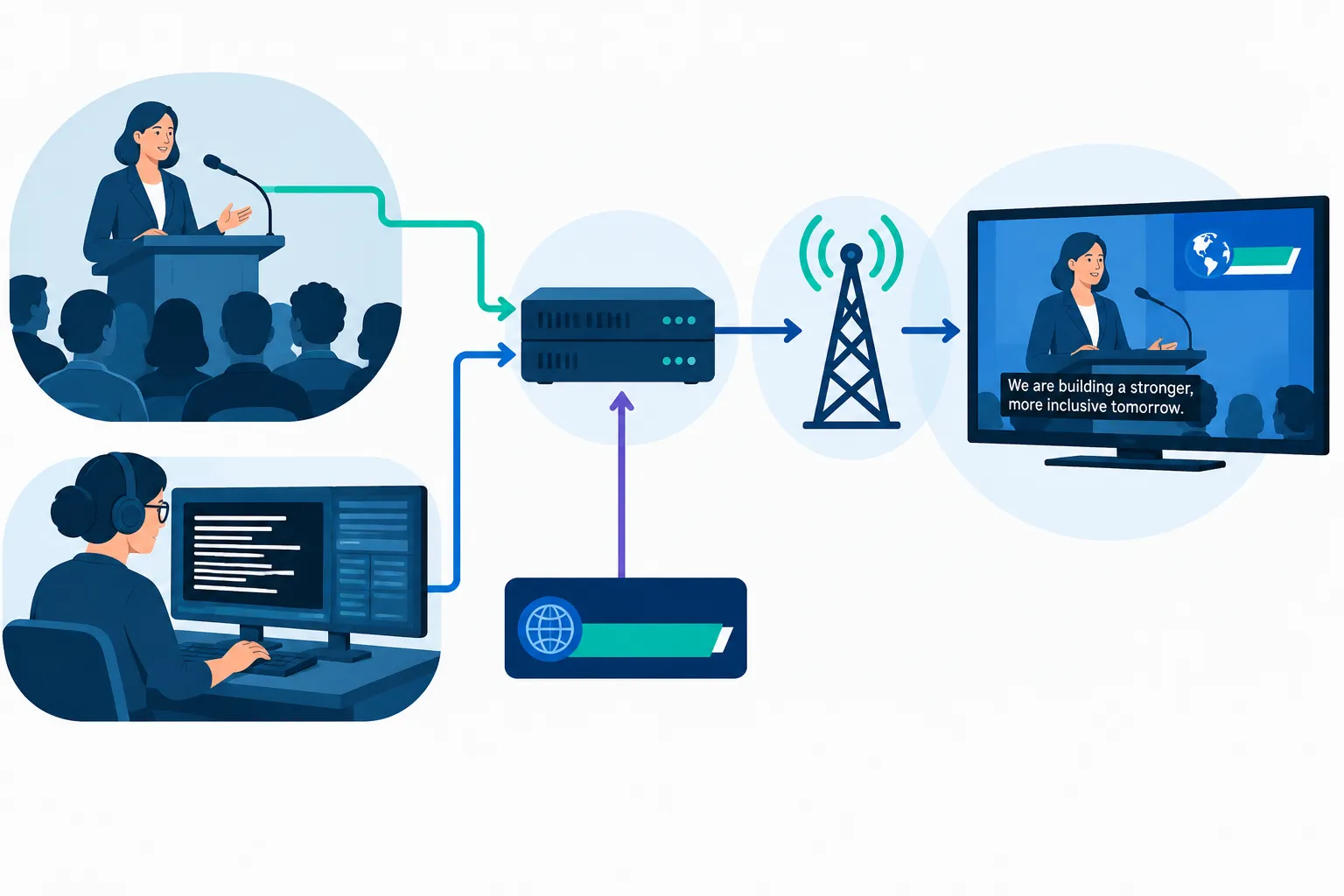
For the technical crew, diagram the route from caption creation through insertion and encoding to a receiving screen. Agree on a backup audio or communication path and what to do if captions disappear. In rehearsal, test a source change and a graphics collision as well as a steady camera shot. Team Stream’s “Closed Captioning Equipment for Live Events” has more on production setup.
Team Stream provides live captioning, event technicians and equipment services. A broadcast team can plan the caption feed and on-site or remote operational support together. For a hybrid program, specify what the television viewer, webcast attendee and in-room audience will each receive. One output may not serve all three.
A practical live-feed review and escalation routine
-
Before air: Put captions on a consumer-facing output, confirm the first cue appears, compare audio and captions, and run the busiest graphics scene.
-
During air: Sample speech, sound cues, transitions and every route change. A monitor should watch the delivered signal, not just the source feed.
-
At a fault: Record the time, destination, affected segment and visible symptom. Tell the appropriate owner whether the issue is source audio, caption content, routing, timing or display.
-
After a correction: Verify the viewer-facing output again. Keep the relevant monitor and equipment records for the broadcaster’s compliance process.
The FCC requires video programming distributors to monitor and maintain caption-related equipment and signal transmissions. When a viewer reports a problem, the time-stamped log helps the team locate where captions stopped or degraded. A word-accuracy percentage alone cannot show whether text arrived on time, stayed on screen or covered the whole show.
When a viewer reports a caption failure
Send the report to the distributor contact and live production lead while the fault is still visible. Save the channel or outlet, program, time, affected words or display behavior, and any available screen recording. The FCC’s television captioning consumer guide says viewers may contact their distributor about an immediate problem. For non-emergency programming, a written complaint to the FCC or distributor must be filed within 60 days of the problem; the distributor has 30 days to respond after receiving it. Those deadlines do not replace an immediate control room repair.
Conclusion
For a live TV broadcast, assess captions at the receiving screen against all four FCC dimensions. Keep the captioner, graphics operator and distribution technician in contact throughout the show. Apply the same checks to an event or webinar while keeping its legal requirements separate. Team Stream can plan live captioning, equipment and technician support around the outputs your audience will use.
FAQ
What are the FCC guidelines for closed captioning on television?
The FCC requires captions on covered television programming to be accurate, synchronous, complete and properly placed. Its rules distinguish live, near-live and prerecorded programs and provide certain exemptions. For a live feed, inspect the delivered program rather than only the captioning workstation.
Who controls closed captioning on TV?
Captioning involves video programmers and distributors, while captioners and production technicians create and carry the live feed. FCC rules assign distributors duties to pass through captions and monitor caption-related equipment and signal transmissions. A producer should name a contact for caption content and a separate contact for signal or display faults.
Does the FCC control streaming content?
Not every stream is covered by the FCC’s television caption rules. Internet-delivered television programming can fall under separate FCC captioning requirements, while an online-only corporate meeting should not automatically be treated as a TV broadcast. Map the distribution outlets before assigning obligations and caption paths.
What’s the difference between subtitles and closed captioning?
Subtitles usually present dialogue, often in another language. Closed captions represent program audio for viewers who cannot hear it, including meaningful sound cues as well as speech. For a live broadcast, assess what information the viewer receives, not just whether dialogue text is visible.
