

Choose webinar translation based on what attendees need to hear, read and say. A listen-only product update might call for translated captions; a technical training session with questions in several languages calls for interpreters and a moderator. Plan for clear microphone audio and an accessible recording as well as the live language feeds.
What webinar translation actually includes
“Translation” can mean several deliverables in a webinar brief. Live interpreting conveys a speaker’s meaning aloud in another language. Translated captions display the speech as text in another language. Source-language captions display it in the original language for a different accessibility need. You can arrange translation of slides, handouts and follow-up emails before or after the event.
A participant who wants to listen in Spanish may prefer a Spanish audio feed, while someone who cannot use audio needs captions. If you promise “Spanish available,” spell out whether you mean audio, text, slides, Q&A, the recording or some combination.
“Captions not only include dialogue, but identify who is speaking and include non-speech information conveyed through sound, including meaningful sound effects.” – W3C Web Accessibility Initiative
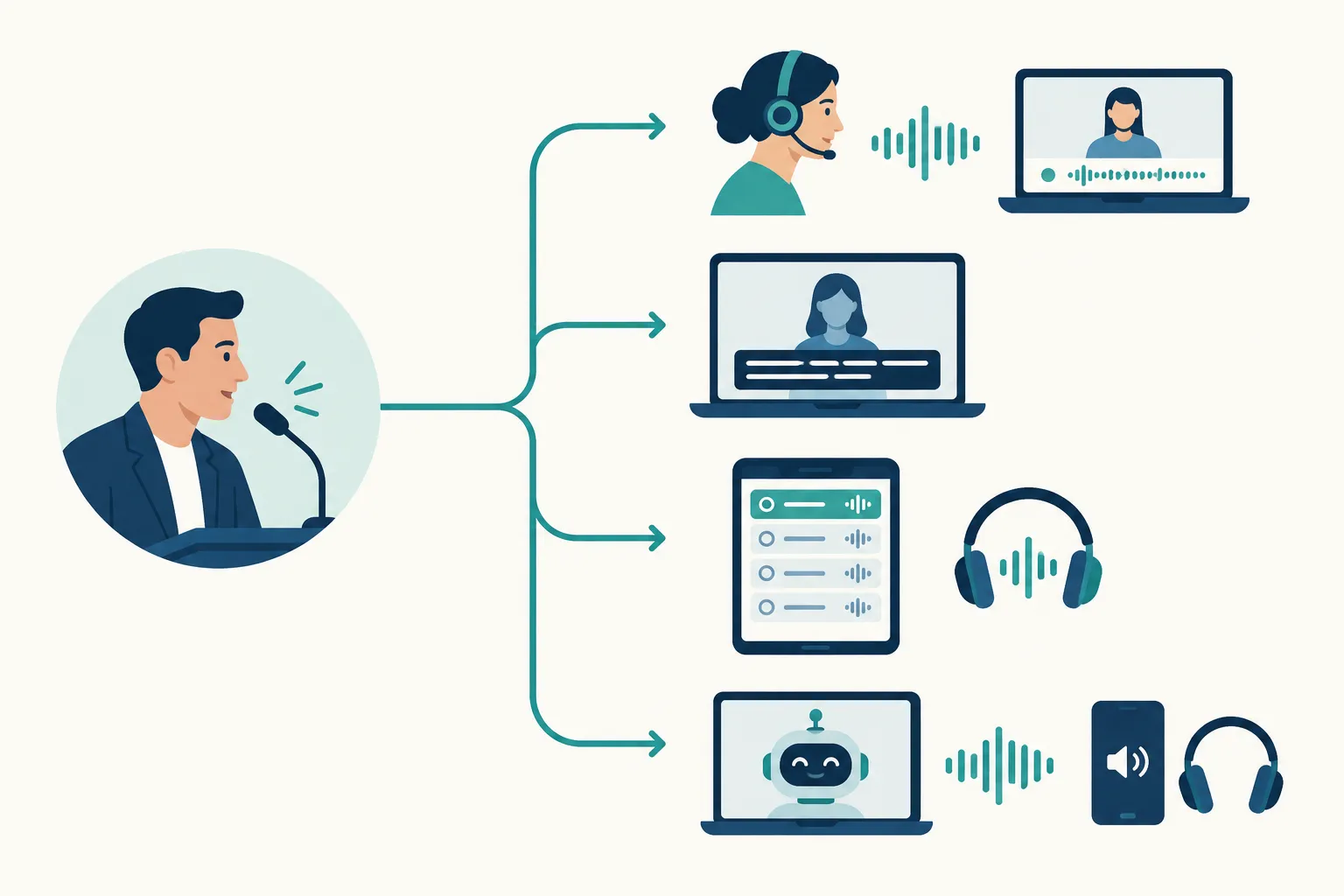
Choose the right live delivery method
|
Method |
What attendees receive |
Good fit |
Main trade-off |
|---|---|---|---|
|
Professional live interpreters |
Spoken interpretation, delivered through a separate audio channel or external listening route |
Interactive, nuanced or high-stakes sessions |
Requires briefing, audio routing and production coordination |
|
Translated live captions |
On-screen text in a chosen language |
Listen-only sessions and attendees who prefer reading |
Text can lag or obscure slides; translation quality depends on clean source speech and review options |
|
Platform-native language channels |
A way for attendees to select a separate audio feed in the webinar platform |
Events already using a compatible webinar format with an interpreter team |
Channels distribute interpreted speech; they do not translate speech by themselves, and availability depends on the event configuration |
|
AI speech translation |
Automated translated audio, sometimes alongside text |
Repetitive, lower-stakes presentations where broad language coverage matters |
Delay, names, jargon and speaker changes need testing and a recovery plan |
Live interpreters for interactive or consequential sessions
Use professional interpreters for policy announcements, specialized training, customer questions or panels with spontaneous exchanges. An interpreter can work alongside a speaker during a one-way presentation. For multilingual Q&A, decide who hears each question, relays it to the presenter and conveys the answer back.
Give interpreters the slides and run of show, along with speaker names, acronyms and terminology. Plan breaks or staffing around the session’s length and intensity. In a hybrid event, remote and in-room attendees may need different listening routes. Test each route.
Translated captions when reading is the practical choice
Translated captions let a distributed audience follow a mostly one-way webinar without switching audio tracks. They can also help viewers who cannot listen at the time. Provide same-language accessibility captions as well when attendees need them; translated text alone may omit speaker identification and meaningful sounds.
Find out where attendees select a caption language, where the text appears and whether the recording will retain it. Dense slides and rapid speaker changes make captions harder to follow, especially when presenters use unfamiliar acronyms. Send caption providers the materials early and trim crowded on-screen copy.
Platform-native language channels for interpreter audio
Language channels carry audio from an interpreter or another translated speech source. They suit teams that want attendees to select audio inside the webinar rather than open another site or use another device.
Test the specific event mode and attendee role: a feature listed in the platform’s menu may work differently in the webinar you are producing. Join the rehearsal with attendee permissions, switch languages, arrive late and try the Q&A. Watch the replay too. Arrange another capture method if your setup cannot record the channels separately.
AI speech translation for scale, with clear boundaries
AI-generated speech can supply translated audio across several languages. Give it clean microphone input, orderly speaker turns and prepared material. Where the service accepts a glossary, include names, product terms and acronyms.
For safety, legal, clinical or other consequential content, plan for a human interpreter or human review. Order accessible captions and recorded translated audio separately if you need them; automated speech translation does not guarantee either.
Match the method to the session
A scripted product launch with a mostly silent audience may suit translated captions or AI speech translation, plus source-language captions if attendees need them. Customer training where attendees troubleshoot aloud needs two-way interpretation and someone to manage turns. On a multilingual panel, give each speaker a clear microphone and plan how interpreters will handle interruptions. A language channel can carry their audio if the event format supports it. You can use different methods for different sessions.
Plan around the audience, not just the platform
Before selecting a service, write a one-page language brief. “We need translation” is too broad to tell the producer what to route or the attendee what to select.
-
Identify language pairs and direction. Is English-to-Spanish enough, or will Spanish-speaking attendees ask questions that must be conveyed back to the presenter? Count languages by session, not only by the overall event.
-
Map participation. A keynote, breakout, panel and open Q&A need different moderation and interpretation plans. Decide where audience questions enter and who will relay or translate them.
-
Define access for each attendee group. Note what in-person attendees, remote attendees and people using mobile devices will hear and see. Include people who need captions in the source language.
-
Set the consequence of an error. General marketing commentary and safety instructions should not share the same quality threshold. Assign human support where misunderstanding could change a decision or instruction.
-
Decide what survives the livestream. Specify which audio feeds, captions, slides and translated assets the on-demand audience will receive.
For a hybrid event, include venue audio, remote-speaker audio, interpreter return feeds and audience microphones in the production diagram. A speaker whose voice is clear in the room may still sound muffled to an interpreter connected remotely.
Prepare and rehearse the production
Put language access in the show flow. Send interpreters, captioners and technicians the agenda, slide deck, script if available, names, acronyms and pronunciation notes. Mark speaker changes and the start of live questions. Assign a producer to monitor the feeds, and give presenters a signal to pause if one fails.
Rehearse in the actual webinar format from an attendee account. Switch languages, enable captions, submit a question and reconnect after dropping out. Listen to the original audio and each translated feed. Then play back a short test recording to hear what the on-demand audience will get.
Prepare an alternate way to reach language access, such as a direct link if your primary access uses a QR code. Put simple instructions in the registration email and opening slide: name each available language, say whether it is audio or text, and explain where to select it. Keep a support contact visible during the session. If translation drops, the moderator can pause, direct attendees to the fallback route and resume once the feed is restored.
Budget for the whole workflow
Ask for a quote that covers language direction, session duration, preparation, rehearsal, technical support, audio paths, captions and recording deliverables. Additional languages, two-way Q&A and hybrid venue equipment all affect the scope. With a limited budget, put live language support where attendees need to participate, and translate approved follow-up materials for sessions they can watch later.
Make the recording useful afterward
The original-language recording only captures one version of the event. Decide whether you also need interpreted audio, translated subtitles, a localized voiceover, translated slide text or a written recap. Keep the source audio and label each recorded track so editors can build the right versions.
For reusable training, review names, figures and technical terms in the source transcript before translating. Caption the final edit, not only the livestream, because cuts can shift timing. If the event includes consequential decisions, agree which language version is authoritative before publishing a translated summary.
A practical planning checklist
|
Decision |
Owner to involve |
Output before launch |
|---|---|---|
|
Who needs which language and format? |
Event lead and audience team |
Language and accessibility brief |
|
Who speaks, listens and asks questions? |
Producer and moderator |
Session flow with two-way Q&A path |
|
Which method fits each session? |
Language provider and event lead |
Interpreter, caption or AI plan by session |
|
How will feeds reach remote and in-room attendees? |
Platform administrator and AV lead |
Audio and caption routing diagram |
|
What if a feed fails? |
Producer and attendee support |
Rehearsed fallback and attendee instructions |
|
What is delivered after the event? |
Content owner and editor |
Recording, subtitle and translation specification |
Conclusion
For live discussion or sensitive meaning, use interpreters. For reading access, provide the appropriate captions. Platform language channels can carry interpreter audio, while AI speech translation can suit lower-stakes presentations across languages. Rehearse what attendees will experience and specify the replay deliverables before going live.
Team Stream brings together professional interpreting, live captioning, translation, subtitling, AI-enabled language services and technical support for virtual and hybrid events. Share your session format, languages and replay goals with the team to plan the right mix of services.
FAQ
Is there a live translator for Zoom?
A live interpreter can deliver another spoken language through a suitable audio route for a Zoom webinar. Whether attendees can select a built-in language channel depends on the webinar configuration; test the exact format and recording before promising that experience.
How do I turn on translate on Zoom?
First decide whether attendees need interpreted audio or translated text; these are different services. Ask the webinar administrator to test the available language features in the actual event mode with an attendee account, then provide clear access instructions before the webinar.
