

Real Time Captioning for Live Events in 2026
If you organize conferences, corporate meetings, trade shows, broadcasts, worship services, webinars, or hybrid events, real time captioning is no longer a nice-to-have. In 2026, it sits at the intersection of accessibility, audience engagement, multilingual communication, and compliance.
Event organizers today face a harder brief than ever: deliver a polished live experience, support remote attendees, meet accessibility expectations, serve multilingual audiences, and reduce technical risk. That is exactly where real time captioning and real time closed captioning come in.
At Team Stream, we help organizations solve this end to end with human expertise, AI-powered efficiency, interpreting, translation, subtitling, technician support, and event-ready equipment. The result is a smoother event for your team and a more inclusive, understandable experience for every attendee.
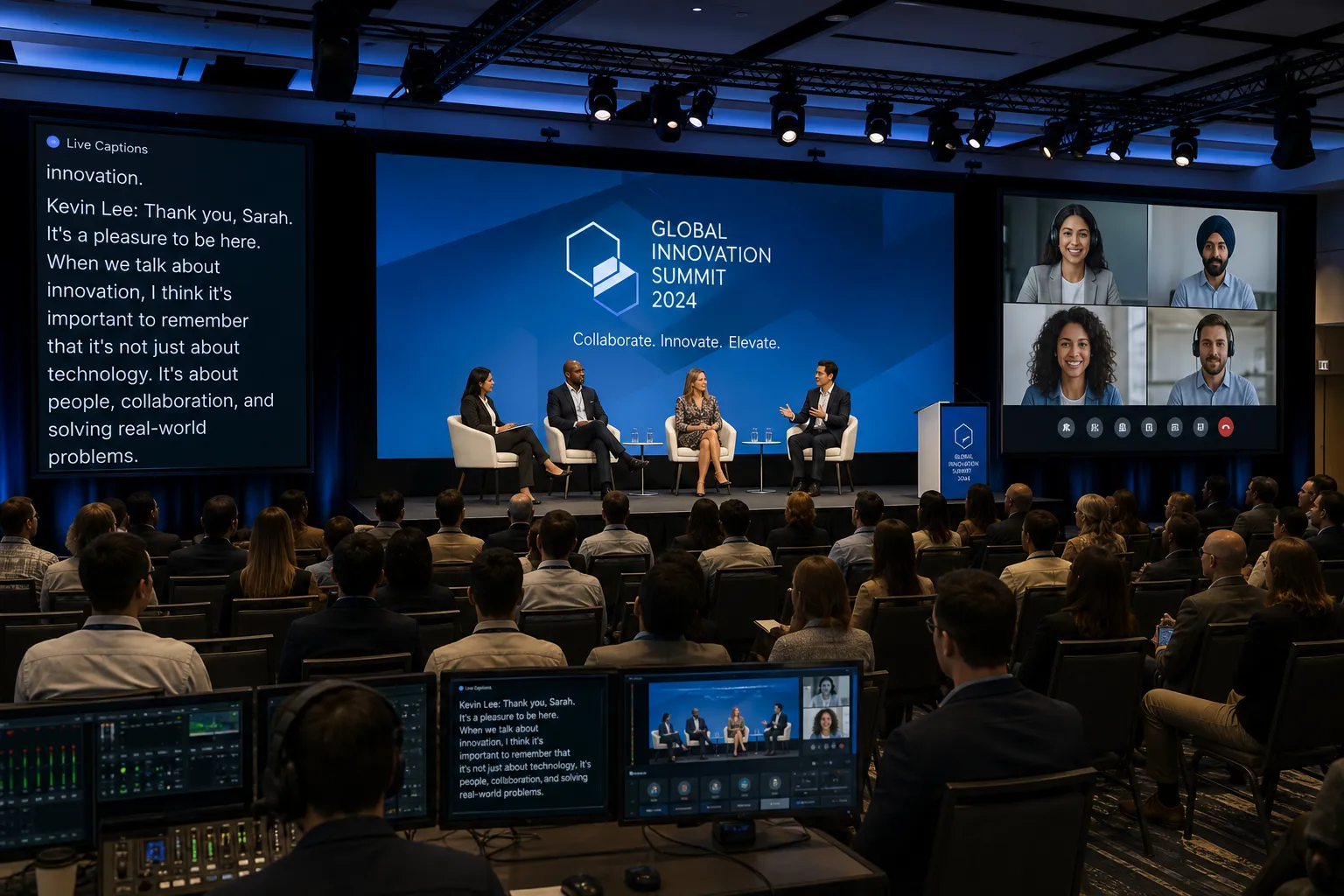
What Is Real Time Captioning?
Real time captioning is the process of converting spoken words and meaningful audio into text as the event is happening. The captions appear live on screens, event displays, streaming platforms, browsers, mobile devices, or video players with minimal delay.
For live events, this can be delivered by:
-
Professional live captioners
-
AI-powered speech recognition
-
A hybrid workflow that combines AI with human oversight
The best choice depends on the event format, terminology complexity, audience needs, compliance risk, and tolerance for errors.
What Is Real Time Closed Captioning?
Real time closed captioning is a specific type of live captioning where the text can be turned on or off by the viewer, usually inside a platform such as Zoom, Teams, YouTube, a webcast player, or broadcast workflow.
In simple terms:
-
Open captions are always visible on screen
-
Closed captions can be enabled or disabled by the viewer
For many live events, organizations use both:
-
Open captions on in-room displays or venue screens
-
Closed captions for virtual or broadcast audiences
Why Real Time Captioning Matters More in 2026
Competitor content often explains accessibility at a high level, but many articles stop short of the operational reality. In practice, real time captioning matters because it improves four things at once: access, understanding, reach, and event performance.
“Captioned videos receive 7–40% more views, depending on the platform, and viewers are 80% more likely to watch these videos to completion.” – Ascynd
“Nearly half of U.S. viewers always or often watch video with captions.” – TV Technology
Those trends carry over into live and hybrid events. Captions help more people stay engaged, follow technical content, and retain what they heard.
Key Benefits for Live Events
Accessibility
Captions support attendees who are:
-
Deaf or hard of hearing
-
Experiencing audio issues
-
In noisy environments
-
Joining from sound-off settings
-
Managing attention or processing differences
Better comprehension
Even attendees with no hearing disability often understand more when they can hear and read at the same time.
Multilingual inclusion
Real time captioning becomes even more powerful when paired with live translation and interpreting, enabling audiences to follow content in more than one language.
Compliance support
Accessibility expectations continue to rise across public-facing organizations, educational institutions, businesses, and digital event publishers.
Better post-event content
A strong live caption workflow makes it easier to produce:
-
Edited transcripts
-
Closed captions for replay
-
Subtitles for social clips
-
Searchable event archives
Where Real Time Captioning Is Used
Real time captioning is now common across nearly every event environment.
In-person events
-
Conferences
-
Trade shows
-
Keynotes
-
Corporate town halls
-
Worship services
-
Training sessions
-
Panels and Q&A sessions
Virtual events
-
Webinars
-
Zoom meetings
-
Microsoft Teams sessions
-
Online classes
-
Livestreams
-
Virtual summits
Hybrid events
Hybrid formats create the most demanding use case because you may need captions delivered:
-
On room screens
-
Inside the stream
-
On attendee devices
-
Across multiple languages
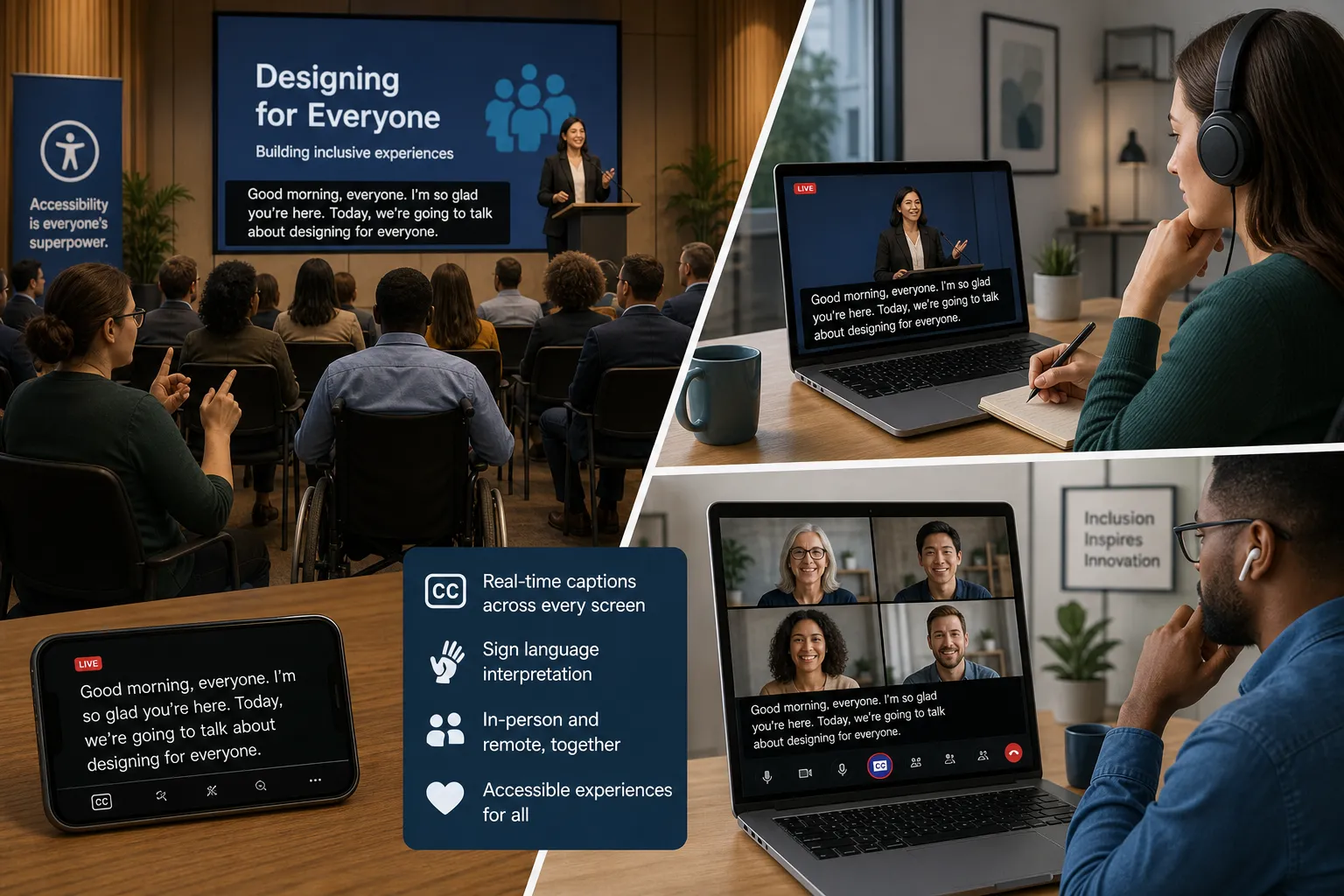
Real Time Captioning vs Real Time Closed Captioning vs CART
These terms are often used interchangeably, but they are not always identical.
|
Term |
What it means |
Best use case |
|---|---|---|
|
Real time captioning |
Live text display of spoken content during an event |
General live events, meetings, webinars, venues |
|
Real time closed captioning |
Live captions that users can turn on or off in a platform |
Streams, virtual events, broadcasts |
|
CART |
Communication Access Realtime Translation, often highly accurate human-generated live transcription |
Accessibility-first events, legal, education, compliance-sensitive settings |
Practical takeaway
If your event has a formal accessibility requirement, high-profile speakers, technical terminology, or a caption-dependent audience, a human-led or human-monitored solution is often the safer route.
If your event prioritizes scale, speed, or budget, AI may be appropriate, especially when paired with preparation and quality control.
How Real Time Captioning Works Behind the Scenes
A lot of articles explain the “what,” but not the “how.” For event planners, understanding the workflow helps prevent last-minute failure.
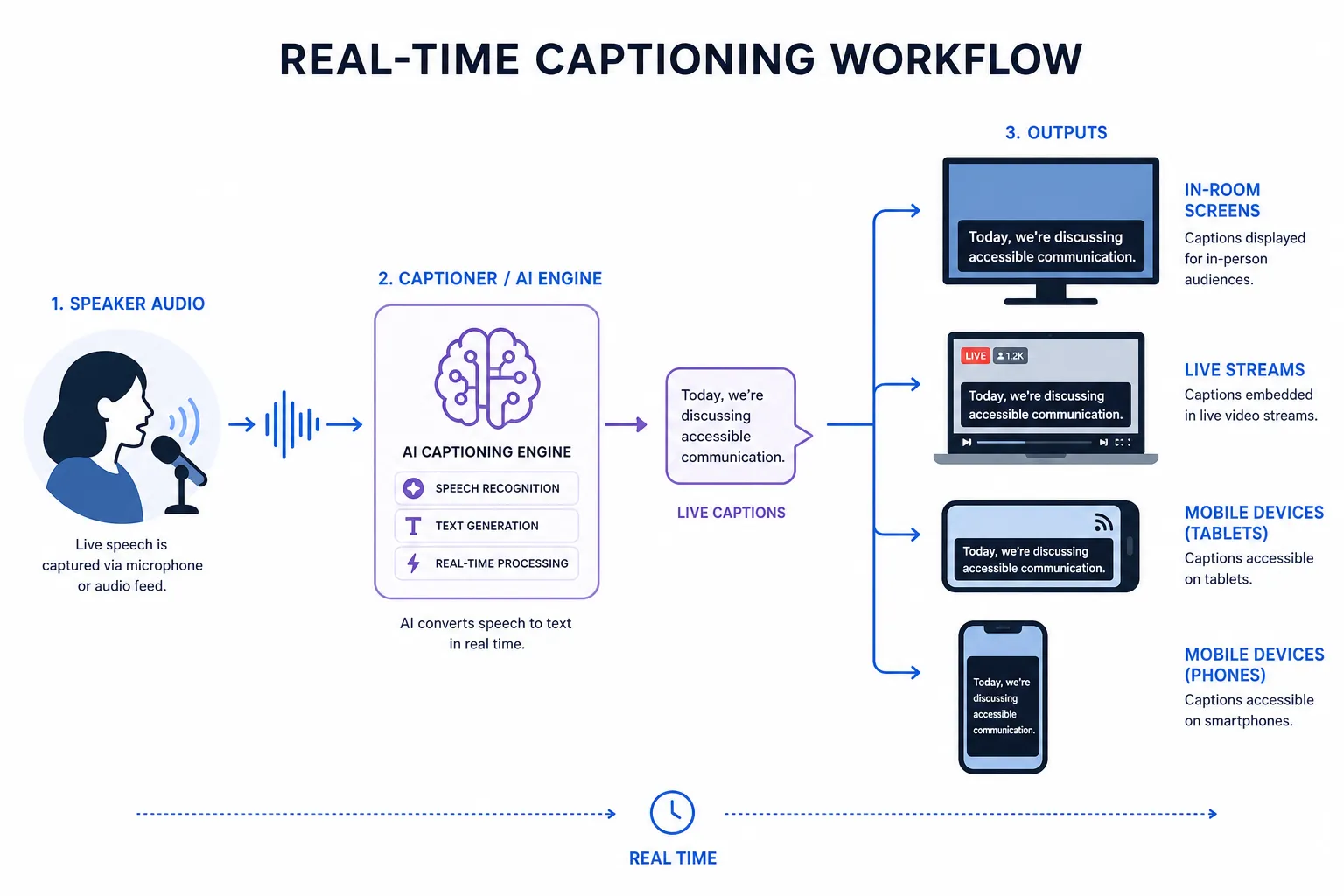
Standard live captioning workflow
-
The speaker audio is captured from the room, platform, or broadcast feed
-
Audio is sent to a captioner, ASR engine, or hybrid captioning system
-
Captions are generated in real time
-
Text is routed to the destination:
-
Venue screen
-
Projection display
-
Stream player
-
Zoom/Teams captions
-
Browser caption page
-
Mobile device
-
-
Optional post-event transcript and caption file are created
What affects quality
-
Audio clarity
-
Speaker pace
-
Accent variation
-
Crosstalk
-
Industry jargon
-
Proper names
-
Platform integration
-
Internet stability
-
Technician setup
This is why Team Stream takes a tailored approach rather than selling a one-size-fits-all package. A board meeting, a global sales kickoff, and a worship livestream all need different captioning workflows.
Human vs AI Captioning in 2026
Both human and AI captioning have a place. The question is not which is universally better. The question is which is right for your event.
Comparison table
|
Factor |
Human Captioning |
AI Captioning |
Hybrid Approach |
|---|---|---|---|
|
Accuracy |
Highest, especially with nuance and difficult audio |
Strong, but variable by audio quality and terminology |
High and scalable |
|
Speed |
Real time |
Real time |
Real time |
|
Cost |
Higher |
Lower |
Moderate |
|
Technical vocabulary |
Strong with prep materials |
Can struggle without training |
Better with glossaries and review |
|
Speaker overlap |
Better handled |
Often problematic |
Improved |
|
Compliance-sensitive events |
Best choice |
May not be enough alone |
Often ideal |
|
Scalability |
Limited by staffing |
Highly scalable |
Flexible |
When human captioning is best
Choose human captioning when you have:
-
High visibility events
-
Legal or compliance risk
-
Accessibility accommodation requests
-
Technical, medical, academic, or financial terminology
-
Multiple speakers and audience interaction
-
A need for polished, dependable output
When AI captioning is a fit
Choose AI when you need:
-
Lower cost at scale
-
Fast deployment
-
Internal meeting coverage
-
Basic accessibility support
-
Large volumes of recurring content
Why many organizations choose hybrid
Team Stream often recommends a hybrid strategy because it balances accuracy, speed, scalability, and budget. With over 25 years of expertise, we help clients decide where human captioners are essential and where AI-supported workflows can deliver value without unnecessary cost.
Accessibility and Compliance Considerations
Many competitors mention compliance, but few explain the operational implication: if captioning is part of your accessibility promise, you need a partner that can actually execute under live conditions.
Why compliance matters
Depending on your organization and event type, accessibility obligations may arise from:
-
ADA expectations
-
WCAG-aligned digital accessibility practices
-
Internal DEI commitments
-
Public sector or education accessibility requirements
-
Corporate policies for inclusive communication
What compliant live captioning should aim for
-
High accuracy
-
Minimal delay
-
Reliable delivery
-
Clear speaker meaning
-
Proper handling of technical terms
-
Availability where attendees actually need it
For recorded replays, the standard is typically even higher. Live captions often need post-event cleanup before becoming final closed captions or subtitles.
Important distinction
Live captions are not automatically finished captions for on-demand video.
They often need editing for punctuation, speaker IDs, sound cues, and timing refinement.
That is why Team Stream supports the full chain:
-
Live captioning
-
Closed captioning
-
Subtitling
-
Translation
-
Voiceover
-
Interpreting
-
Post-production accessibility workflows
What Event Organizers Should Look for in a Live Captioning Provider
Choosing a provider is about more than whether captions appear on screen. It is about whether the service works under pressure.
Essential evaluation criteria
|
Criteria |
Why it matters |
|---|---|
|
Accuracy |
Poor captions damage access and brand perception |
|
Delivery options |
You may need captions on screens, streams, mobile devices, and recordings |
|
Human + AI flexibility |
Different event segments may require different workflows |
|
Language support |
Captioning often overlaps with live translation and interpreting |
|
Technician support |
Live events fail when the caption workflow is not actively managed |
|
Equipment compatibility |
Venue AV, streaming platforms, encoders, and displays must work together |
|
Responsiveness |
Last-minute changes are common in live production |
|
Post-event services |
Transcripts, subtitle files, and translated versions save time later |
Questions to ask before booking
-
Can you support in-person, virtual, and hybrid events?
-
Do you offer both human and AI-powered solutions?
-
Can captions be displayed on venue screens and streamed remotely?
-
Can you support multilingual events?
-
Do you provide technicians or equipment rental if needed?
-
What happens if speakers change or the run of show shifts?
-
Can you also handle interpreting, subtitling, and translation?
These are the kinds of practical questions Team Stream answers every day.
Real Time Captioning for Different Event Types
Corporate meetings and internal communications
Captions improve clarity during:
-
Leadership town halls
-
Investor calls
-
Training sessions
-
Product launches
-
Global all-hands meetings
They also support multilingual workforces and employees joining from different environments.
Conferences and trade shows
Captions help:
-
Increase audience understanding in large rooms
-
Support attendees in the back or near noisy expo areas
-
Make keynotes more inclusive
-
Extend content into replay, clips, and translated assets
Broadcast and livestream production
Broadcast workflows often require more than basic captions. You may need:
-
Encoder integration
-
Streaming platform compatibility
-
Multiple delivery endpoints
-
Low-latency workflows
-
Technician monitoring
Churches and worship services
Faith-based organizations increasingly use live captions to support:
-
In-person congregants
-
Livestream audiences
-
Multilingual ministries
-
Archived sermon content
Education and training
Captions improve accessibility and understanding for:
-
Lectures
-
Seminars
-
Workshops
-
Compliance training
-
Certification programs
The Multilingual Opportunity: Beyond English Captions
One major content gap in competitor articles is that they often treat captioning as a single-language accessibility tool. In 2026, leading organizations use it as part of a broader language access strategy.
Real time captioning + interpreting + translation
When combined strategically, you can offer:
-
English captions for accessibility
-
Spanish or other language interpretation for attendees
-
Translated subtitles for replay content
-
Voiceover for training and post-event distribution
This is where Team Stream stands out. We do not just provide one service in isolation. We deliver end-to-end language and accessibility solutions tailored to the format, audience, and business goal of each event.
Common Challenges With Live Captioning
No live event is frictionless. The right preparation makes the difference.
Challenge: poor room audio
Fix: Use proper audio feeds, mics, sound checks, and technician oversight.
Challenge: fast or overlapping speakers
Fix: Brief speakers, moderate Q&A, and choose a provider experienced with live event pacing.
Challenge: specialized terminology
Fix: Share agendas, glossaries, names, scripts, and slide decks beforehand.
Challenge: platform limitations
Fix: Confirm destination formats early: screen display, webcast embed, Zoom CC, browser-based caption pages, or mobile access.
Challenge: multiple languages
Fix: Use a coordinated provider for interpreting, translation, and captioning rather than piecing together separate vendors.
Best Practices to Improve Real Time Captioning Results
Before the event
-
Share speaker names and titles
-
Send glossary and terminology lists
-
Provide agendas and presentation decks
-
Test audio routing
-
Confirm display destinations
-
Decide whether you need open captions, closed captions, or both
During the event
-
Keep speakers on mic
-
Avoid side conversations
-
Use a moderator for audience Q&A
-
Have technician support available
-
Monitor the attendee experience on-site and remotely
After the event
-
Export transcript files
-
Edit captions for replay
-
Add subtitles to highlight clips
-
Translate key sessions
-
Archive accessible content for future use
Team Stream’s Approach to Real Time Captioning

At Team Stream, we approach real time captioning as part of the full event communication ecosystem.
What makes our approach different
Human and AI-powered flexibility
We offer accurate human captioning, AI-enabled solutions, and blended workflows designed around your event’s risk, budget, and audience expectations.
End-to-end support
We can support:
-
Live captioning
-
Real time closed captioning
-
Interpreting
-
Written translation
-
Subtitling
-
Voiceover
-
Equipment rental
-
On-site and remote technicians
Tailored event design
We do not force you into a generic package. We build the right workflow for:
-
Live events
-
Hybrid conferences
-
Virtual meetings
-
Broadcasts
-
Church services
-
Corporate communications
Compliance-friendly service
We help organizations create inclusive communication experiences that align with accessibility goals and reduce avoidable risk.
Proven experience
With 25+ years of expertise, Team Stream is built for organizations that need dependable execution, responsive service, and professional support before, during, and after the event.
How to Decide What You Need
If you are planning an event in 2026, use this quick guide.
You likely need basic AI captioning if:
-
It is an internal meeting
-
Risk is low
-
Budget is tight
-
You need broad caption coverage across many sessions
You likely need human or hybrid captioning if:
-
Accessibility is critical
-
Your audience will rely on captions
-
The content is technical or high stakes
-
The event is client-facing or public-facing
-
You need a polished brand experience
You likely need a full language-access plan if:
-
You have multilingual attendees
-
You are producing a hybrid or global event
-
You want interpreting and captions together
-
You need post-event translations, subtitles, or voiceover
Final Verdict
Real time captioning in 2026 is not just about converting speech to text. It is about making live communication accessible, understandable, professional, and scalable across every audience touchpoint.
The strongest events now treat captioning as part of a broader strategy for accessibility, engagement, and multilingual communication. That means planning beyond the caption line itself: audio routing, display method, platform integration, interpreting, translated content, technician support, and post-event usability.
If you want a partner that can handle that full picture, Team Stream is built for it. We combine human expertise, AI-powered language solutions, captioning, interpreting, translation, equipment, and technician support to help you deliver inclusive live, virtual, and hybrid experiences with confidence.
Need real time captioning or real time closed captioning for your next event?
Choose Team Stream for a tailored solution backed by world-class service, responsive support, and decades of experience in live communication.
FAQ
What is real time closed captioning for live events?
Real time closed captioning is live text that appears during an event and can usually be turned on or off by the viewer inside a streaming or meeting platform. It helps make live content more accessible, understandable, and compliant for in-person, virtual, and hybrid audiences.
What is the best live captioning service?
The best service is one that matches your event’s needs for accuracy, reliability, delivery format, and language support. For high-stakes events, a provider like Team Stream that offers human, AI-powered, and hybrid captioning plus technician support is often the strongest choice.
How can I get a live caption?
You can get live captions by working with a captioning provider that connects to your venue audio, webcast, meeting platform, or broadcast feed. Team Stream can set up open captions, closed captions, browser-based captions, and multilingual support depending on your event format.
How much do closed captioners get paid?
Closed captioner pay varies widely based on experience, specialization, language skill, and whether the work is live or post-production. Highly skilled real time captioners and CART professionals typically command higher rates because the work requires speed, precision, and live-event expertise.
What is the best live captioning service?
The best live captioning service combines strong accuracy, responsive support, flexible delivery, and event readiness. Team Stream stands out for organizations that need more than captions alone, including interpreting, translation, equipment, and technician support for seamless execution.
How much does InnoCaption cost per month?
InnoCaption pricing is not the focus of this article, and consumer app pricing can change over time. For business, conference, and event use, it is better to evaluate a provider like Team Stream based on service scope, event complexity, accessibility needs, and support requirements rather than comparing only monthly app cost.
