

Spanish to English Translators: Best Options for Text, Voice, Speech, and Live Communication
If you need a reliable Spanish to English translator, the right choice depends on what you are translating, how fast you need it, and how much accuracy matters. A traveler trying to read a menu, a marketing team localizing web copy, a conference producer supporting multilingual attendees, and a business handling compliance-sensitive communication do not need the same solution.
That is where most competitor articles fall short. They usually compare apps, but they rarely explain when an app is enough, when a voice tool is better, and when you need professional human translation, interpreting, captioning, or a blended human-plus-AI workflow. This guide closes that gap.
At Team Stream, we help organizations move beyond one-size-fits-all tools. With more than 25 years of experience, we support live, virtual, and hybrid events, business communications, broadcasts, churches, and accessibility initiatives with accurate human and AI-powered translation and interpreting, live captioning, subtitling, voiceover, equipment rental, and technician support. So while this article reviews popular tools, it also shows you how to choose the option that protects quality, speed, inclusivity, and audience trust.
Quick Answer: What Is the Best Spanish to English Translator?
Here is the short version:
-
Best for quick everyday text translation: Google Translate
-
Best for polished written phrasing: DeepL
-
Best for multilingual meetings and conversation mode: Microsoft Translator
-
Best for Spanish learners and dictionary-backed use: SpanishDictionary
-
Best for hands-free travel conversations: dedicated voice devices like Timekettle
-
Best for business-critical, public-facing, legal, medical, live-event, or accessibility-sensitive communication: professional human translators and interpreters, often supported by AI tools
If you need the best free Spanish to English translation for casual use, start with an app. If you need communication that is accurate, audience-ready, brand-safe, or compliance-friendly, move up to a managed solution.
What Top Ranking Articles Get Right – and What They Miss
Most top-ranking pieces agree on a few themes:
-
People want a good Spanish to English translator that is fast and easy
-
Free apps dominate search interest
-
Voice translation is increasingly popular
-
Accuracy varies by context
-
Offline features matter for travel
Those are useful points, but they often gloss over critical buying questions:
Content gaps most articles miss
1. They do not separate use cases clearly enough
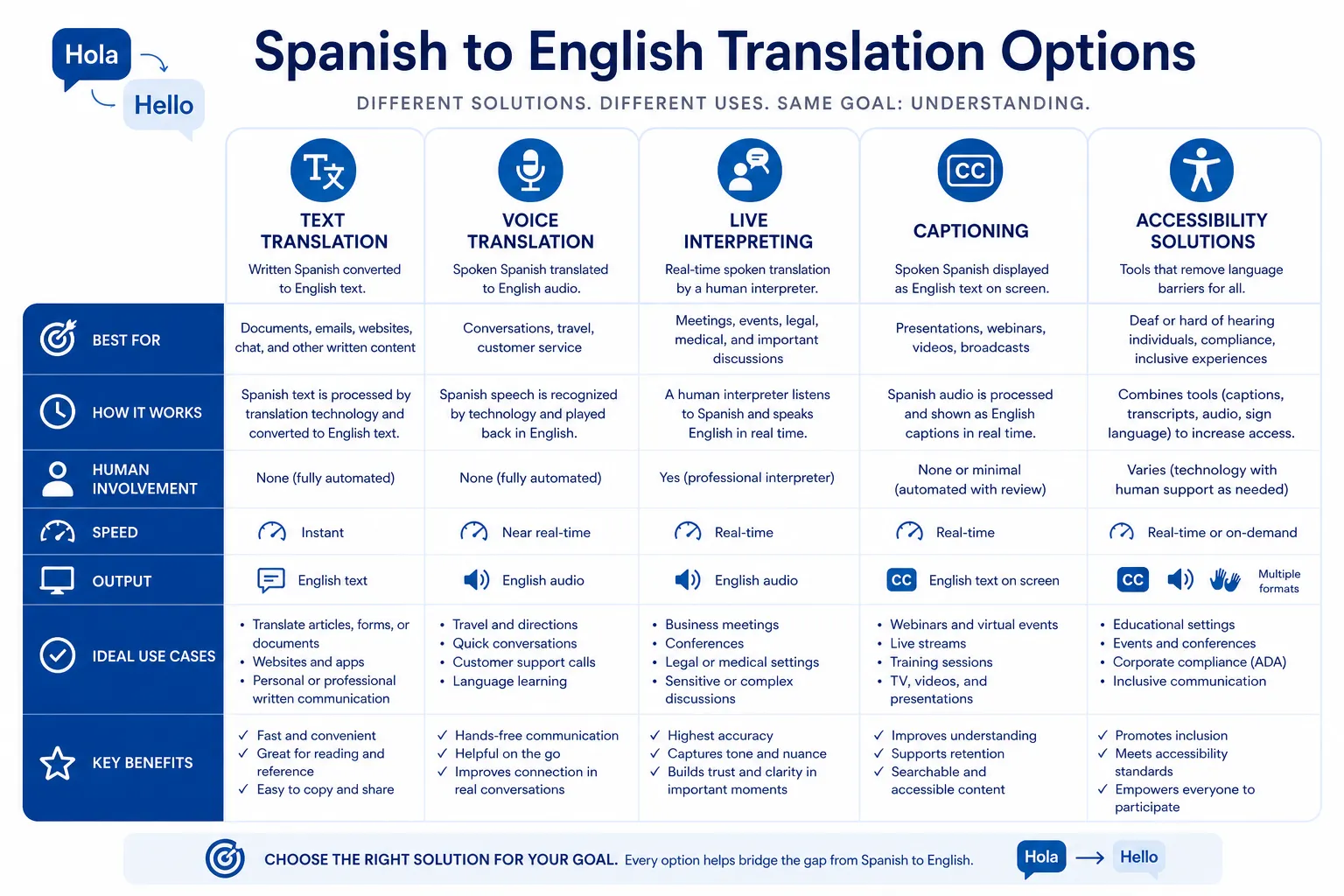
Text translation, speech translation, live interpreting, captions, and subtitling are related but not interchangeable.
2. They underplay risk
A free tool can be fine for “Where is the train station?” but risky for executive messaging, healthcare, HR, legal, or live audience communication.
3. They skip accessibility
For many organizations, the issue is not just translation. It is language access plus accessibility: captions, multilingual interpretation, and inclusive participation.
4. They rarely discuss event execution
For conferences, webinars, trade shows, and broadcasts, success depends on interpreters, captioners, audio routing, technician support, remote workflows, and backup plans.
5. They ignore hybrid service models
Today, the strongest solution is often human expertise enhanced by AI, not human-only or app-only.
That is why businesses, event teams, and institutions increasingly work with partners like Team Stream for tailored support rather than relying on an app alone.
How Spanish to English Translation Tools Actually Differ
Before choosing a tool, it helps to know the main categories.
|
Type |
Best For |
Main Strength |
Main Limitation |
|---|---|---|---|
|
Text translation app |
Quick messages, signs, basic emails |
Fast and cheap |
Can miss tone, nuance, context |
|
Voice translator app |
Travel, basic spoken exchange |
Real-time convenience |
Accent/noise/context issues |
|
Speech-to-speech device |
In-person conversation |
Hands-free interaction |
Still machine dependent |
|
Dictionary-backed translator |
Learning and phrasing checks |
Better definitions and usage help |
Less suited to long or complex content |
|
Human translator |
Documents, websites, brand content |
Accuracy, style, terminology |
Higher cost than free tools |
|
Human interpreter |
Meetings, events, negotiations |
Live clarity and nuance |
Requires planning |
|
Live captions/subtitles |
Accessibility and engagement |
Inclusive communication |
Must be configured correctly |
|
Hybrid human + AI workflow |
Scale plus quality control |
Fast and accurate |
Needs expert management |
How Accurate Are Spanish to English Translators?
Accuracy depends on four things:
-
Context
-
Content complexity
-
Audio quality or text quality
-
Human review
A machine can translate common phrases very well. It struggles more with:
-
idioms
-
ambiguous wording
-
regional slang
-
industry jargon
-
humor
-
legal or contractual language
-
poetry, branding, and emotionally loaded copy
-
noisy live audio with overlapping speakers
“Translations from English to Spanish can reach up to 90% accuracy on factual content.” – Crowdin Blog
That sounds strong, but the remaining error rate can still matter a lot.
“A 96% accuracy rate on a 10,000-word document implies approximately 400 potential errors.” – Tomedes
For a casual message, that may be acceptable. For a contract, keynote, training program, investor update, or compliance-sensitive event, it is not.
Best Spanish to English Translators by Use Case
Best for Everyday Text Translation: Google Translate
Why it stands out
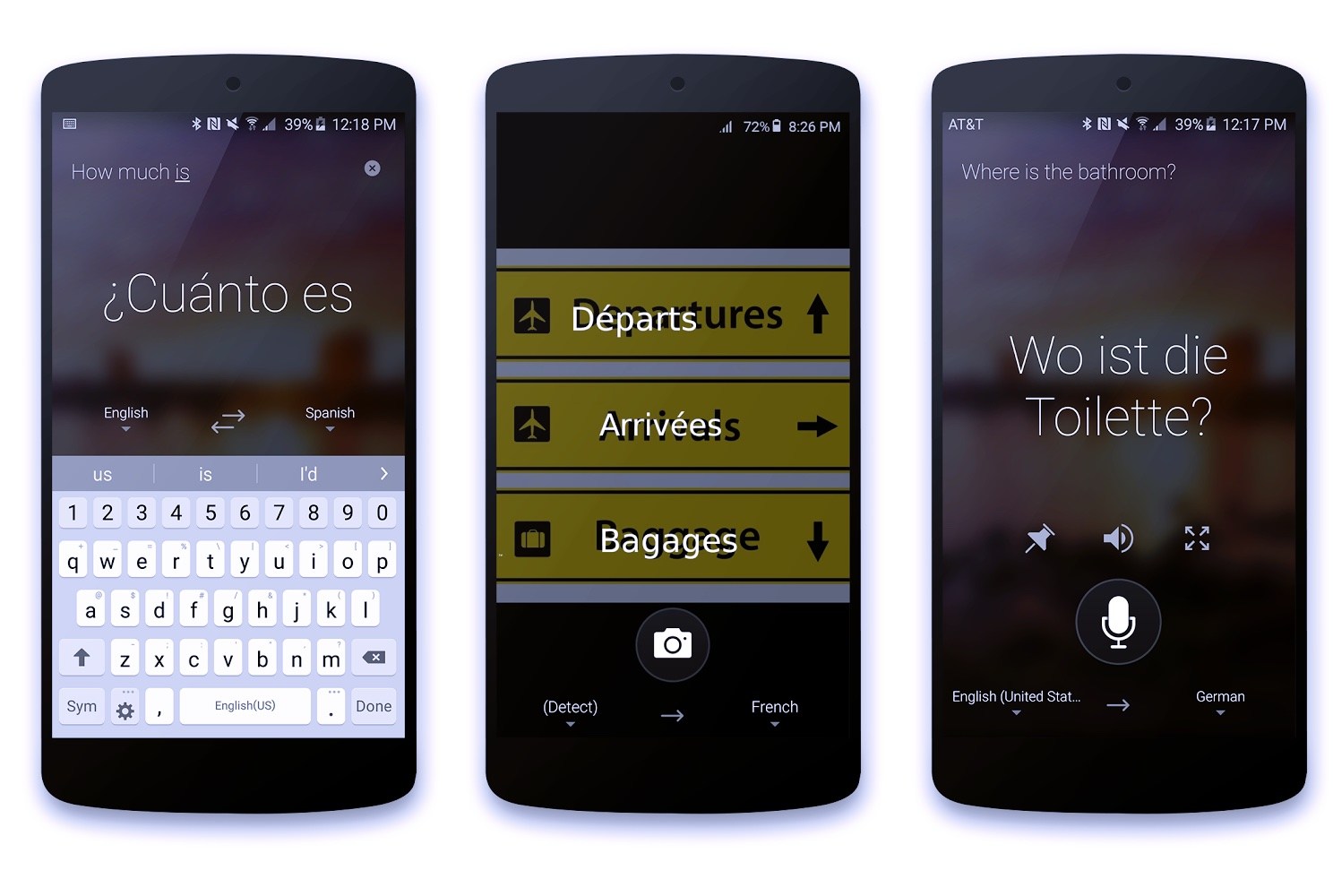
Google remains the default choice for many people because it is fast, free, widely available, and supports text, camera, voice, and conversation features.
Best for
-
travel
-
quick chats
-
signs and menus
-
rough drafts
-
instant gist translation
Strengths
-
broad language support
-
strong mobile experience
-
camera translation
-
conversation mode
-
easy to use on the go
Limitations
-
phrasing can sound literal
-
tone may feel flat or awkward
-
less dependable for nuanced business copy
Verdict
If you need a google Spanish to English translator for everyday use, it is still one of the strongest starting points.
Best for Cleaner Written Output: DeepL
Why it stands out
DeepL is often preferred when users want more natural-sounding sentence structure, especially for written content.
Best for
-
emails
-
short documents
-
internal business notes
-
cleaner drafts for review
Strengths
-
often smoother phrasing
-
better readability in many cases
-
good for side-by-side editing
Limitations
-
fewer languages than Google
-
may still miss intent or specialized terminology
-
should not replace professional review for high-stakes copy
Verdict
If you want an accurate Spanish to English translator for polished draft text, DeepL is a strong option.
Best for Meetings and Conversation Mode: Microsoft Translator
Why it stands out
Microsoft Translator is especially useful in group communication scenarios and has practical conversation features.
Best for
-
multilingual meetings
-
business travel
-
team collaboration
-
cross-language chats
Strengths
-
conversation-friendly design
-
Microsoft ecosystem compatibility
-
solid multilingual support
-
useful for live collaboration
Limitations
-
interface preferences vary by user
-
not a replacement for live interpreters in critical settings
Verdict
A solid pick if you need an online translator English to Spanish or Spanish to English for team communication and meeting support.
Best for Learners and Dictionary Precision: SpanishDictionary
Why it stands out
SpanishDictionary is not just a translator. It combines dictionary depth, usage examples, conjugations, and learning support.
Best for
-
students
-
Spanish learners
-
vocabulary checks
-
phrase comparisons
-
understanding grammar choices
Strengths
-
rich examples
-
dictionary-led confidence
-
conjugation support
-
regional awareness
Limitations
-
less suited to large-scale professional localization
-
not designed to replace human editing for production content
Verdict
For users who want an English and Spanish translator with learning support, this is one of the best resources available.
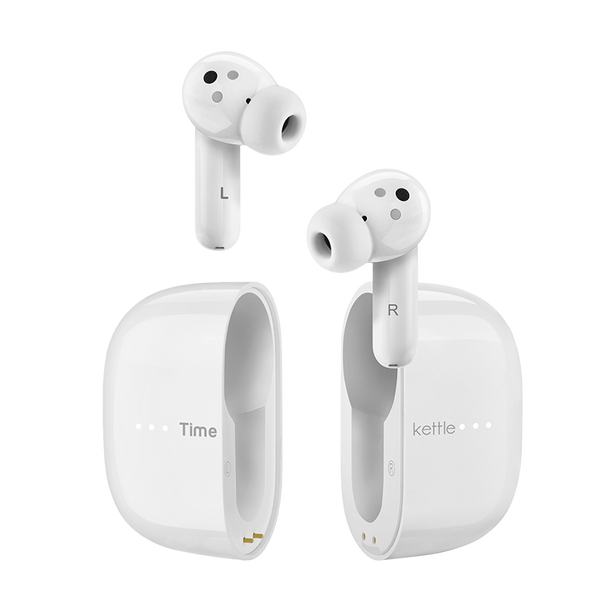
Best for Hands-Free Voice Translation: Timekettle and Similar Devices
Why it stands out
Dedicated translation earbuds and handheld devices are designed for speech-first situations where typing is impractical.
Best for
-
travel
-
hospitality
-
in-person customer interaction
-
multilingual tours
-
basic real-time spoken exchanges
Strengths
-
fast speech handling
-
more natural conversational workflow
-
portable hardware options
-
useful for repeated face-to-face interactions
Limitations
-
audio conditions still affect results
-
device claims may outperform real-world performance
-
not ideal for complex negotiations, medical consent, legal matters, or public-facing event delivery
Verdict
If you are looking for a Spanish to English talking translator or Spanish to English speech translator for travel and simple conversation, these tools can help.
Best Option for Business-Critical Communication: Professional Language Services
Why this category wins when stakes are high
No app can fully replace a trained linguist who understands audience, context, tone, terminology, confidentiality, and delivery requirements.
Best for
-
legal and HR content
-
healthcare communication
-
executive messaging
-
websites and campaigns
-
conferences and live events
-
training programs
-
captions and accessibility
-
multilingual broadcasts
-
compliance-sensitive communication
What a managed solution adds
With Team Stream, clients can combine:
-
professional written translation
-
live interpreting for in-person, remote, and hybrid events
-
live captioning and CART services
-
subtitling and voiceover
-
AI-supported workflows with human quality control
-
equipment rental and technician support
-
flexible delivery for conferences, churches, webinars, trade shows, and broadcasts
Verdict
If you need the best translator for Spanish in a business or event context, the strongest answer is usually not a standalone app. It is a professionally managed language-access solution.
Side-by-Side Comparison of the Best Options
|
Tool/Service |
Text |
Voice |
Real-Time Speech |
Offline Potential |
Best For |
Risk Level |
|---|---|---|---|---|---|---|
|
Google Translate |
Excellent |
Good |
Good |
Yes |
Travel, quick text, signs |
Moderate |
|
DeepL |
Excellent |
Limited |
Limited |
No/limited |
Better-written drafts |
Moderate |
|
Microsoft Translator |
Good |
Good |
Good |
Some support |
Team conversations |
Moderate |
|
SpanishDictionary |
Good |
Limited |
Limited |
Some support |
Learning, vocabulary, phrasing |
Low to moderate |
|
Translation devices |
Basic to good |
Good |
Good |
Some models |
Travel conversations |
Moderate |
|
Team Stream human + AI services |
Excellent |
Excellent |
Excellent |
N/A |
Business, events, accessibility |
Lowest for high-stakes use |
How to Choose the Best Translator for Your Situation
If you need a tool for travel
Choose:
-
Google Translate
-
Microsoft Translator
-
a handheld or earbud voice device
Look for:
-
offline mode
-
camera translation
-
conversation mode
-
fast voice input
If you need help learning Spanish or checking phrasing
Choose:
-
SpanishDictionary
-
DeepL as a comparison tool
Look for:
-
examples
-
conjugations
-
regional variants
-
dictionary context
If you need to translate emails or basic internal documents
Choose:
-
DeepL
-
Google Translate
-
then have a bilingual reviewer check it
Look for:
-
natural phrasing
-
copy/paste efficiency
-
formatting retention
If you need live multilingual communication
Choose:
-
professional interpreters
-
managed audio/captioning workflows
-
event-ready support from Team Stream
Look for:
-
interpreter expertise
-
platform compatibility
-
redundancy planning
-
technician support
-
accessibility integration
If you need public-facing or regulated content
Choose:
-
professional human translation
-
optional AI-assisted workflow with human review
Look for:
-
terminology management
-
confidentiality
-
style consistency
-
legal or sector knowledge
Why Accessibility Should Be Part of the Conversation
One of the biggest omissions in translator roundups is accessibility. Translation is only part of communication. Audiences also need to hear, read, follow, and participate.
For events and broadcasts, that often means:
-
live captioning
-
closed captioning
-
multilingual subtitles
-
on-screen language feeds
-
interpreters for spoken language or sign language
-
remote and on-site technician coordination
“Live captions convert audio dialogue and sounds into text in real time, providing an inclusive experience for participants who may not otherwise be able to hear speakers and sounds at the event.” – Harvard Digital Accessibility Services
This is where Team Stream provides more than a simple language translator. We help clients build inclusive, compliance-friendly communication across live, virtual, and hybrid environments, backed by responsive service and dependable execution.
Common Mistakes to Avoid When Choosing a Spanish Translator
Assuming “free” means “good enough”
Free tools are useful, but not for everything.
Confusing translation with interpreting
Translation is written. Interpreting is spoken and live.
Forgetting accessibility
If part of your audience needs captions, subtitles, or alternate access, translation alone is incomplete.
Ignoring regional variation
Spanish differs across countries and audiences. Tone and terminology should match your audience.
Using machine output without review
Even a good English to Spanish translator or Spanish-to-English app needs oversight when message quality matters.
Waiting too long for event planning
Interpreting, captioning, and technical setups work best when planned early.
When to Upgrade from an App to a Professional Solution
You should move beyond self-service tools when:
-
your message represents your brand
-
the audience is large or public
-
there are legal, healthcare, or compliance implications
-
live Q&A or multilingual participation matters
-
accessibility is required
-
failure would be expensive, visible, or reputationally damaging
This is especially true for:
-
conferences
-
annual meetings
-
product launches
-
executive town halls
-
trade shows
-
worship services
-
webinars
-
training and onboarding
-
broadcast productions
Team Stream supports all of these with end-to-end language and accessibility solutions tailored to each client, including remote and in-person options.
Best Workflow Recommendations by Audience Type
|
Audience |
Best Option |
|---|---|
|
Tourist or casual user |
Google Translate or Microsoft Translator |
|
Student or language learner |
SpanishDictionary + DeepL |
|
Sales rep traveling abroad |
Voice translator device + app backup |
|
Small business translating simple copy |
App draft + human review |
|
Corporate team hosting multilingual meeting |
Live interpreter + captions |
|
Conference or trade show producer |
Team Stream interpreting, captioning, equipment, and tech support |
|
Church or ministry with diverse audience |
Team Stream language access and accessibility support |
|
Broadcast or video team |
Team Stream subtitling, captioning, voiceover, and multilingual production support |
Final Verdict: What Is the Best Spanish to English Translator?
The best translator Spanish to English depends on the job.
-
For quick and free everyday use, Google Translate is hard to beat.
-
For better-written drafts, DeepL is often stronger.
-
For live team conversations, Microsoft Translator is practical.
-
For learning and definitions, SpanishDictionary is excellent.
-
For voice-led travel use, dedicated devices can help.
But for accuracy, audience experience, accessibility, and high-stakes communication, the best choice is professional support.
That is where Team Stream delivers real value. We combine human expertise and AI-powered efficiency with live interpreting, captioning, translation, subtitling, voiceover, equipment rental, and technician support. Whether your need is in-person, remote, live, virtual, or hybrid, we help you communicate clearly, inclusively, and confidently.
Need More Than an App?
If you are planning a meeting, event, broadcast, worship service, training, or multilingual content rollout, Team Stream can help you choose the right mix of:
-
professional translation
-
live interpreting
-
captioning and accessibility services
-
AI-enhanced workflows
-
equipment and technician support
When the message matters, do not settle for “close enough.” Choose a partner that makes communication work for everyone.
FAQ
What is the best voice translator for Spanish to English?
For casual travel and simple conversations, Google Translate, Microsoft Translator, and dedicated voice devices like Timekettle are strong options. For important meetings, events, or sensitive conversations, a professional interpreter is the better choice.
What is the best way to translate Spanish to English in real time?
The best approach depends on the setting. For everyday use, a real-time app or translator device works well, but for live events, business meetings, or public-facing communication, professional interpreting plus live captioning provides much better clarity and accessibility.
What is the best translator for translating English to Spanish?
For free tools, Google Translate and DeepL are among the best starting points. If the content is customer-facing, regulated, or brand-sensitive, the best option is a human translator supported by expert review.
What is the best free Spanish to English translator?
Google Translate is the most widely used free option thanks to its text, voice, camera, and mobile features. Microsoft Translator and SpanishDictionary are also excellent depending on whether you need conversation tools or dictionary-style language support.
Is there a free audio translator that can translate Spanish to English?
Yes. Google Translate and Microsoft Translator both offer free voice translation features for Spanish and English. They are useful for basic communication, but for high-stakes live communication, human interpreting and captioning remain more dependable.
