If you need an ASL video to text translator for a recording, ask for an English translation of the signed message. For a live conversation, ask for an ASL interpreter; for spoken audio in text, ask for captions or CART. Tell the provider which language you have, which output you need, and whether anyone needs to respond in real time.
For a quick visual explanation of captions and subtitles in ASL, watch this short video:
What does “ASL video to text” mean?
American Sign Language (ASL) has its own grammar. Speech-to-text tools process audio, so they cannot extract the meaning of a signed message from a silent video.
“The complex visual-spatial linguistic structure of ASL is distinct from English.” – National Association of the Deaf
Someone asking for an ASL video translator may want written English from a signed recording, or a signed video from English content. An ASL video interpreter usually supports a live conversation between ASL and English participants. Specify which direction you need.
|
You have |
You need |
Request |
|---|---|---|
|
A recording of a person signing in ASL |
A written English version of the signed message |
ASL-to-English video translation or a reviewed transcript |
|
A live meeting with ASL and English participants |
Real-time communication in both directions |
ASL-English interpreting, in person or by video |
|
Live speech at a meeting or event |
Readable English text as people speak |
CART or live captioning, depending on the event and delivery needs |
|
A recorded English-language video |
An ASL version for viewers |
English-to-ASL video translation with a signer on screen |
|
A video with spoken audio |
Timed on-screen text for that audio |
Closed captions or subtitles, as appropriate |
The English text from an ASL recording conveys the signed message rather than exporting one English word per sign. Tell the provider if you need speaker changes, timing, or visual references in the output.
For a public video, decide whether you need a standalone transcript, timed captions, or both. Include any chart or person the signer points to in the source footage, so the translator can carry that reference into English.
Translation and interpreting are different jobs
Translation gives you a version of recorded content in another language: a signed video from an English script, for example, or an English document from an ASL presentation. Your team can review terminology and approve the result before publication.
Interpreting happens during a meeting, service, interview, or event. The interpreter conveys meaning between ASL and English while participants ask questions and respond. A transcript prepared afterward cannot serve someone who needs to take part in that exchange.
If you record a live session, plan for two audiences. Attendees may need interpreting during the event, while later viewers may need edited captions or translation. Name both deliverables in the request.
Which service fits your event or video?
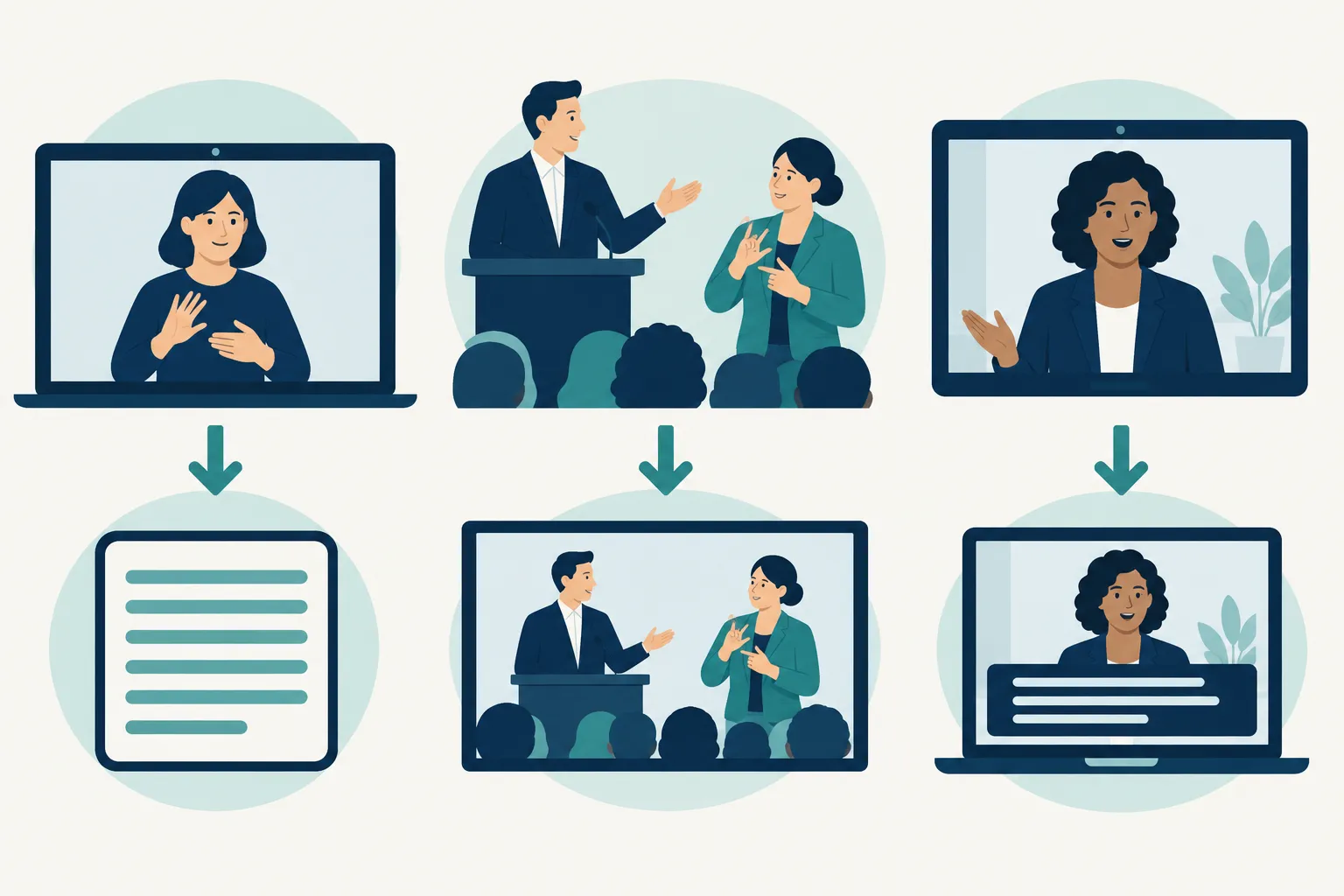
ASL interpreting for live, two-way participation
Book an interpreter when a Deaf signer needs to present, ask questions, or join a discussion. Give attendees a clear view of the interpreter on site and on screen. At a hybrid event, a camera shot that works in the room may leave remote viewers unable to see the signing, so plan both views.
Send the agenda and any names or terminology the interpreter should prepare. Explain when the audience can ask questions and whether the interpreter will work from ASL to English, English to ASL, or both. For a panel or multi-session program, include breaks in the schedule when requesting coverage.
CART and live captions for spoken content in text
Communication Access Realtime Translation (CART) produces text from speech during a live session. Live captioning also displays speech as text, often integrated with a stream or meeting platform. The exact setup depends on whether attendees need a personal text feed, captions in the video player, text on a venue screen, or more than one of these.
The National Association of the Deaf defines CART as the instant translation of spoken words into English text. If a participant needs a dedicated text view, describe that access need; if a broadcast audience needs text embedded in its player, describe the player and distribution path. “CART” and “captions” name related text-access workflows, not a guarantee that the same feed will work on every screen.
Both CART and live captions give viewers text for spoken content. A signer needs an ASL-to-English interpreter or translator to convey their message in English, while an ASL interpreter does not produce a written record of every spoken word. If attendees use different forms of access, provide both interpreting and captions according to their needs.
Captions and translated ASL video for recordings
Closed captions time speech and relevant sounds to the video. Subtitles often show dialogue in another written language. For a silent video of someone signing, the production team needs an ASL-to-English translation before it can create English captions for the signed message.
If you start with an English presentation and need ASL, produce a signed video. Decide where the signer will appear alongside the original footage and whether you also need captions. Leave enough space to see the signing without covering slides or other important visuals.
|
Situation |
Primary service |
Additional deliverable to consider |
|---|---|---|
|
Live Q&A with a Deaf presenter |
ASL-English interpreting |
Live captions for spoken portions |
|
Conference keynote with spoken audio |
CART or live captions for text access |
ASL interpreting if attendees request ASL access |
|
Recorded ASL message for an English-speaking team |
ASL-to-English translation |
Timed captions or a separately formatted transcript |
|
Prerecorded English training for ASL users |
English-to-ASL translated video |
Captions for viewers who use text |
|
Live event later released on demand |
Interpreting and/or captions during the event |
Edited captions or translated video for the final recording |
How to request the right service the first time
Give the provider these details when requesting ASL translation services:
-
Source and direction: Is the source signed ASL, spoken English, or an English script? Which language and format should the audience receive?
-
Timing: Is this a live exchange, a recording to process, or both? Give the event date or recording deadline.
-
Deliverable: Do you need an interpreter feed, live text, a plain-English document, timed captions, or a signer video? Name each separate output.
-
Audience and setting: Explain whether people will participate on site, remotely, or in a hybrid format, and how they will see or read the service.
-
Materials and production: Share a run of show, script, slide deck, terminology, source video, and any platform or screen constraints that apply.
For a recording, you could write: “We have a video of a presenter signing in ASL. We need an English translation as a readable transcript, plus timed English captions on the finished video.” For a meeting: “We need live ASL-English interpreting for a hybrid Q&A, with the interpreter visible to in-room and remote attendees.” The first request needs a finished text and video deliverable; the second needs live access.
Can an app translate ASL video into text?
Automatic sign recognition has to account for hand movement, facial expression, spatial references, and context. If the camera cuts off the signer’s hands or face, part of the message may be missing. Do not use an app demonstration as the sole basis for a transcript of a presentation, interview, or public-facing message.
For important material, request human ASL-to-English translation with a review step. If your team also uses AI tools, assign someone to review names, technical terms, and meaning before release. A live conversation still calls for interpreting.
Make the request about access, not the tool name
Signed footage headed for an English-speaking audience needs translation. A live exchange calls for interpreting; a speech-based presentation may need CART or captions. Depending on who is attending, your event may need more than one service.
Team Stream provides interpreting, captioning, translation, and event production support for live, virtual, and hybrid settings. Share your source material, audience needs, and intended outputs with the team to plan the right combination.