

Choose interpreting solutions by identifying who needs to speak and listen, in which languages, and whether the conversation goes both ways. A keynote delivered to three language groups needs a different setup from a private HR meeting or an interactive training. Settle the audience and interaction first, then choose the interpreter, delivery channel, and equipment.
The wrong format shows up fast: guests hear a delayed feed, cannot find their channel, or have no way to ask a question. Sort out those details before the first microphone goes live.
Start with the communication need
Map language needs across main-stage talks, breakouts, registration, audience questions, networking, recordings, and follow-up materials. The keynote’s language feed will not cover a workshop unless you plan for it.
Use four questions to define the job:
-
Who speaks and who listens? Count presenters and participants by language, and identify anyone who needs to speak back. Interpretation from English into Spanish does not by itself provide a return path from Spanish into English.
-
How fast must the exchange move? A fast panel needs near-real-time delivery. A one-to-one discussion can pause between turns.
-
How will people attend? Note the room, video platform, phone participants, and whether remote attendees need the same language choices as people on site.
-
What access does each person need? Spoken-language interpreting, sign-language interpreting, and captions serve different needs. Ask participants which accommodation and delivery method works for them rather than assuming one substitutes for another.
Send interpreters the subject matter, terminology, slides, speaker names, and agenda updates before the session. For specialized discussions, ask how the provider matches interpreters to the topic and handles unfamiliar terms.
Choose the interpreting method
The interpreting method sets when the audience hears the message; the delivery channel sets where the interpreter works. Simultaneous interpreting, for example, can take place on site or remotely.
|
Method |
How it works |
Best fit |
Main planning constraint |
|---|---|---|---|
|
Simultaneous spoken-language |
Interpreter listens and speaks while the presenter continues |
Keynotes, panels, large multilingual meetings |
Dedicated audio routing, listening devices or channels, and a clean speaker feed |
|
Consecutive spoken-language |
Speaker pauses for interpretation after a short segment |
Interviews, training with discussion, small meetings |
Extra time in the agenda and disciplined pauses |
|
Whispered interpreting |
Interpreter quietly interprets for one person or a very small group |
Brief, low-noise in-person exchanges |
Proximity and room acoustics; it does not scale to an auditorium |
|
Sign-language interpreting |
Interpreter communicates between a spoken language and a signed language |
Meetings or events with participants who use that signed language |
Clear sightlines or suitably framed video, lighting, and participant preferences |
Spoken-language interpreting is not the same as ASL
American Sign Language (ASL) has its own grammar and structure. A Spanish audio channel cannot serve an ASL user, while ASL interpretation cannot serve Spanish-speaking listeners who need spoken-language interpreting. Signed languages vary by region and community, so specify the language participants use instead of requesting generic “sign language.”
“ASL is a language with its own grammar, rules, and structure, and is not a signed form of English.” – National Association of the Deaf
In person, position the interpreter so attendees can see both the interpreter and the presentation. Online, keep the interpreter’s video visible during slides and screen sharing. Ask the person receiving the service what viewing arrangement works for them.
Match interpreting solutions to the room
Choose the delivery mode based on how people participate. A hybrid conference might use an on-site interpreter for a keynote and a remote interpreter for an online breakout.
|
Delivery |
Strong use case |
Watch for |
|---|---|---|
|
On-site interpreting |
Large live events, complex room interaction, sessions where interpreter visibility matters |
Travel and room logistics, booths or positioning, technician and audio coordination |
|
Video remote interpreting |
Virtual and hybrid meetings, visible sign-language support, interactive remote sessions |
Stable connectivity, camera framing, usable audio, platform layout and a fallback plan |
|
Over-the-phone interpreting |
Brief, audio-only conversations or unexpected language needs |
No visual cues; poor fit for slides, sign language, or a large audience listening at once |
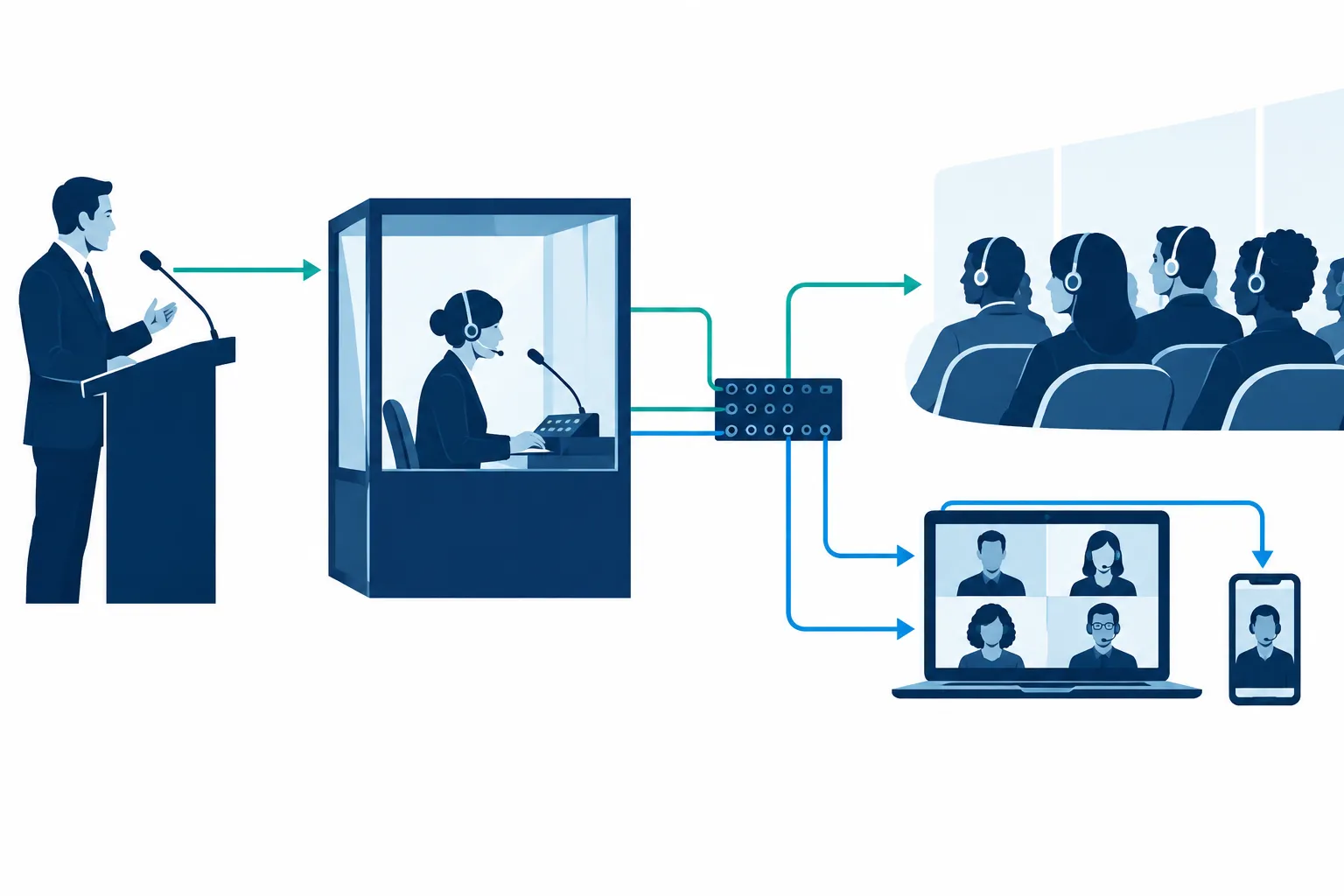
For on-site simultaneous interpreting, map the signal path before booking: speaker microphone to interpreter feed, interpreter microphone to audience channel, then receivers or a listening app for attendees. Multiple stages may need separate equipment.
Remote delivery can reduce travel needs, though it depends on the connection and platform. Decide who controls language channels, admits interpreters, and helps guests who lose audio. In a hybrid room, test both directions: can remote participants hear the interpreter, and can the interpreter hear questions from the floor?
Over-the-phone interpreting (OPI) works for short, unplanned conversations. A conference broadcast needs a different setup. Use video or an event-grade system if participants must see a demonstration, read lips, view a signed-language interpreter, or follow speakers in a noisy room.
Decide where AI belongs
For a low-stakes exchange without a human interpreter available, AI interpreting can give participants a quick sense of routine speech. It can also support a workflow led by people. Accuracy depends on the source audio, accents, overlapping speech, and terminology; the consequences of a mistake should determine whether that is acceptable.
Use a qualified human interpreter or a human-led workflow for safety instructions, legal or HR conversations, sensitive pastoral exchanges, public announcements, and technical training where a wrong term matters. Give the interpreter briefing materials and a way to ask for clarification. An AI feed cannot ask a speaker to resolve ambiguity or help a participant repair a misunderstanding.
Have the provider demonstrate the workflow with your microphones, languages, and content. Find out whether the system produces translated text, synthetic speech, or both. Ask how a person intervenes, how the provider handles participant data, and what happens if the connection fails. The label “AI-powered” does not answer any of those questions.
Plan accessibility alongside language access
Interpreting services, captioning, and document translation address different language access needs. Live captions put speech on screen for people who need or prefer text. Translated captions help an audience follow another spoken language; a two-way discussion still calls for a way to interpret each participant’s speech. Written translation covers documents, signage, and materials people read outside the live exchange.
Treat each event output separately:
-
Live room: Decide who receives interpreted audio, visible sign language, and live captions. Keep sightlines to speakers, screens, and interpreters usable.
-
Virtual audience: Put language selection and captions where attendees can find them. Tell them how to switch channels before the session starts.
-
Recording: Decide whether the replay needs captions, translated subtitles, voiceover, or an interpreted version. A live language channel does not necessarily appear in the saved recording.
-
After the event: Translate key written resources and make sure follow-up messages reach the same language groups.
Access requirements vary with the setting and audience. The ADA’s effective communication guidance ties the choice of aid to the nature, length, complexity, and context of the exchange, as well as the person’s usual communication method. One feature cannot guarantee compliance for an entire event. Record the accommodations requested, the delivery plan, and the requirements that apply to your organization.
Build a brief your provider can execute
Give the provider the details needed to price the job and plan the show:
|
Include |
Why it matters |
|---|---|
|
Date, location, time zone, run of show, and breaks |
Determines coverage and staffing |
|
Language pairs and direction of interpretation |
Determines which interpreters and channels are needed |
|
Audience size by language and participation format |
Determines receivers, channel setup, and support |
|
Session format, topic, speakers, and prep materials |
Helps plan the method and prepare terminology |
|
Accessibility requests, including signed language and captions |
Prevents a spoken-audio plan from overlooking visual or text access |
|
Venue AV, streaming platform, recording requirements |
Establishes signal routing and deliverables |
Compare proposals line by line: interpreter coverage, preparation, equipment, receiver distribution, technician time, remote platform support, rehearsals, and recording deliverables. A price that assumes your venue supplies the audio crew is not equivalent to one that includes technicians.
Rehearse as an attendee: join as a guest, choose a language, listen to an audience question, read the captions, and view the signed-language feed if needed. Name an owner for each handoff among the production crew, platform host, interpreters, and support desk. Keep a replacement microphone, spare receiver, alternate connection, or pause-and-reset procedure ready.
Conclusion
Match the method to the conversation, the delivery mode to the venue, and the access features to the people attending. A small meeting may need consecutive interpreting over video; a multilingual conference may need simultaneous audio channels, captioning, and on-site technical support. Walk through the experience as an attendee before deciding the setup is ready.
Team Stream offers human interpreting, AI-enabled language services, captioning, translation, and equipment and technician support for live, virtual, and hybrid events. If your project has several formats or access needs, ask Team Stream to plan the language routes and production handoffs together. That gives you one place to work through the attendee experience before the event.
