

Real Time Subtitling for Live Multilingual Events
If you organize conferences, town halls, webinars, trade shows, worship services, investor events, or live broadcasts, you already know the challenge: one spoken message rarely reaches every attendee equally. Some audience members are joining in a noisy venue. Some are deaf or hard of hearing. Some speak a different first language. Some are remote. And all of them need to follow what is being said in the moment, not after the event is over.
That is exactly where real time subtitling becomes essential.
For modern live events, subtitles are no longer a “nice to have.” They are a practical communication layer that improves accessibility, strengthens engagement, supports multilingual participation, and helps organizations move closer to compliance goals. The best solutions also go beyond simple on-screen text, combining captioning, subtitle translation, live interpreting, technical setup, and support from experienced specialists.
At Team Stream, we see this every day. Clients do not just need words on a screen. They need accurate, reliable, compliance-friendly communication support that works across live, hybrid, and virtual formats. That is why Team Stream delivers tailored human and AI-powered language access solutions, including live captioning, interpreting, subtitling, translation, technician support, and equipment services backed by more than 25 years of experience.
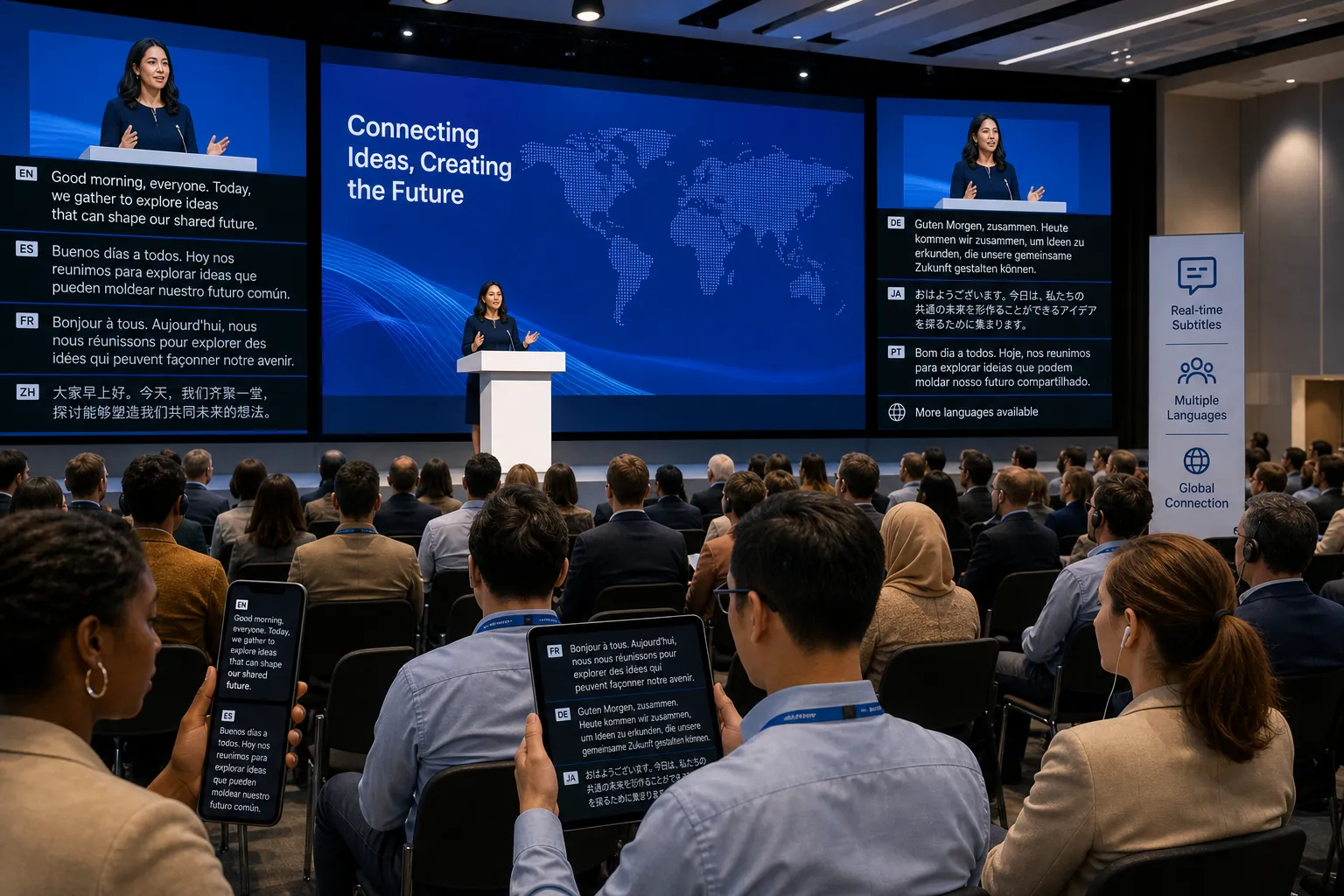
What Is Real Time Subtitling?
Real time subtitling is the process of converting live speech into text and displaying it immediately for an audience while the event is happening. Depending on the setup, those subtitles may appear:
-
On large venue screens
-
Inside a webcast or livestream player
-
In Zoom, Teams, or another meeting platform
-
On mobile devices through a browser link or QR code
-
In multiple languages at the same time
In same-language use cases, people often call this live captioning. When the spoken content is converted and then translated into another language, it becomes real time subtitle translation or real time subtitles translation.
The key difference is timing: live subtitles help attendees understand content as it unfolds, which is critical for Q&A sessions, panel discussions, keynote speeches, worship services, training, and any event where instant comprehension matters.
Why Real Time Subtitles Matter More Than Ever
Competitor pages consistently emphasize accessibility and multilingual reach, and they are right. But many gloss over a more important truth: subtitles improve the event experience for almost everyone, not only for people with diagnosed hearing loss or for international viewers.
Real-world reasons event teams invest in live subtitles
-
Attendees miss spoken details in noisy rooms
-
Remote participants deal with variable audio quality
-
Technical sessions include jargon, acronyms, and names that are hard to catch
-
Global audiences need support in their preferred language
-
Event owners want stronger engagement and less audience drop-off
-
Organizations need to show a serious commitment to inclusion
Where they deliver the most value
|
Event Type |
Why Real Time Subtitles Help |
|---|---|
|
Conferences |
Improve understanding during fast-paced sessions and multilingual panels |
|
Corporate town halls |
Make executive updates clearer for distributed teams |
|
Webinars |
Increase readability, attention, and replay value |
|
Trade shows |
Support attendees in loud expo environments |
|
Broadcasts |
Expand accessibility and multilingual audience reach |
|
Churches and worship services |
Help in-room and remote audiences follow sermons and music |
|
Training events |
Improve retention and comprehension across language backgrounds |
Captions vs. Subtitles vs. Interpreting: What’s the Difference?
One of the biggest content gaps in competitor pages is clarity around terminology. Many readers are still unsure whether they need captions, subtitles, or live interpreters. Here is the simplest way to think about it.
Quick comparison
|
Service |
Main Purpose |
Output |
Best For |
|---|---|---|---|
|
Live captioning |
Accessibility and readability |
Same-language text |
Deaf/hard-of-hearing access, noisy environments, clarity |
|
Live subtitling |
Readable same-language text in real time |
On-screen text |
General audience comprehension during live sessions |
|
Real time subtitles translation |
Multilingual access |
Translated text |
International audiences following a speaker in another language |
|
Live interpreting |
Full language access through audio/sign language |
Spoken interpretation or signed interpretation |
Attendees who want to listen in their own language rather than read |
A practical rule
-
If your audience needs to read the speaker’s words in the original language, use live captions.
-
If your audience needs to read those words in another language, use real time subtitles.
-
If your audience needs to hear or see interpretation in another language, use interpreters.
In many events, the strongest solution is not choosing one. It is combining them.
That is one of Team Stream’s biggest advantages. Instead of offering a one-size-fits-all package, we help clients build the right mix of human expertise, AI-powered support, accessibility tools, and technical delivery for the audience they actually have.
How Real Time Subtitle Translation Works
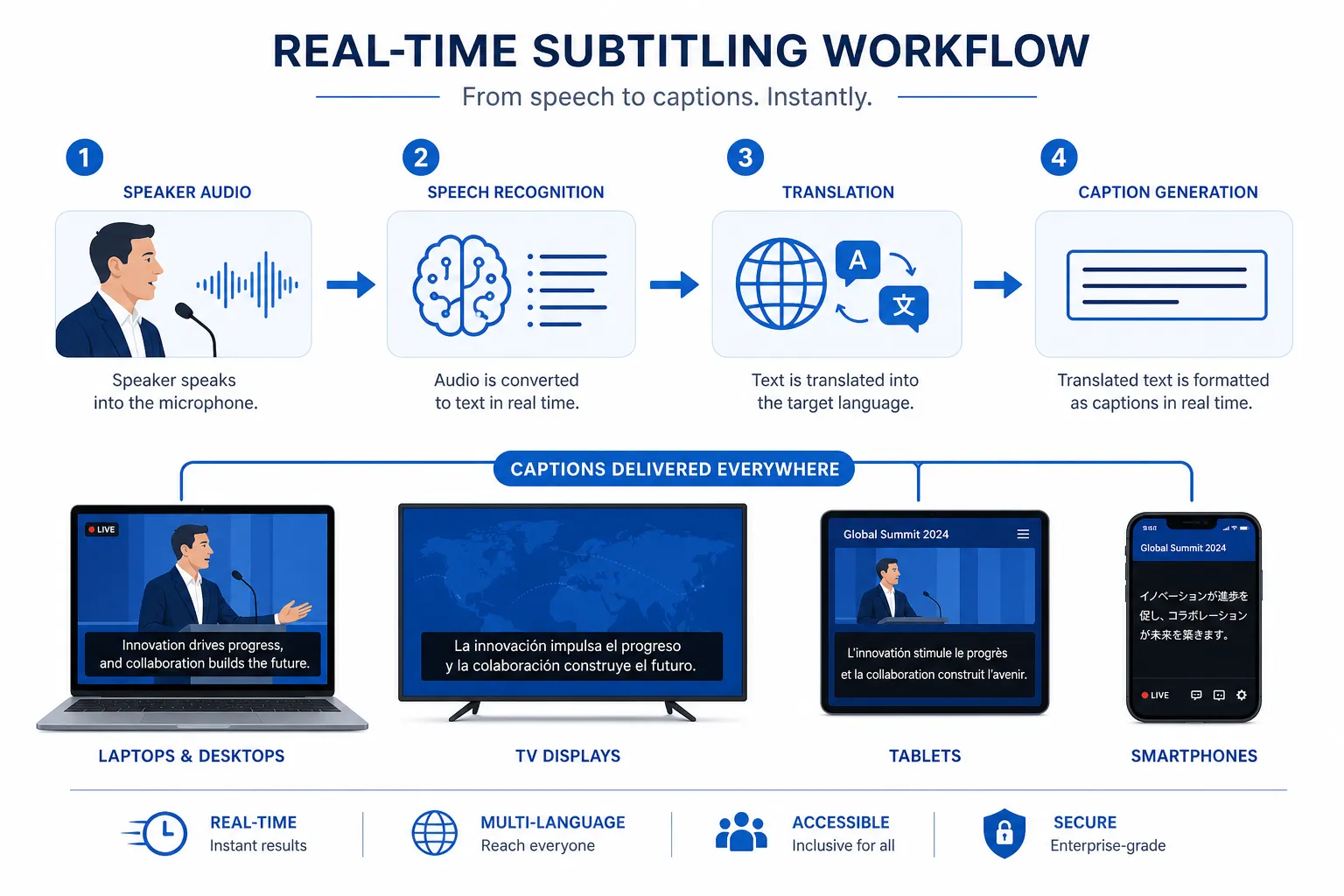
At a high level, the workflow is straightforward. The quality, however, depends on the execution.
Step 1: Capture clean live audio
Everything starts with audio quality. A direct feed from microphones, soundboards, or the meeting platform gives the subtitling system the best possible source signal.
Step 2: Convert speech into text
This can happen through:
-
Human captioners, who deliver premium accuracy in challenging or high-stakes settings
-
AI speech recognition, which offers speed and scalability
-
Hybrid workflows, where AI and human oversight are combined for better performance
Step 3: Translate text into one or more languages
If the audience needs multilingual support, the source-language text is translated in real time into the selected target languages.
Step 4: Deliver subtitles to the audience
Subtitles can be shown through:
-
Event screens
-
Projection systems
-
Embedded webcast players
-
Meeting platform overlays
-
Audience mobile devices
-
Remote attendee browsers
Step 5: Support the event live
This is where many articles fall short. Live subtitling is not just software. It is an active event workflow. You need people and systems in place to monitor timing, audio integrity, terminology, output channels, and attendee access.
That is why Team Stream supports clients with end-to-end delivery, including pre-event planning, equipment rental, technician support, captioning and interpreting workflows, and in-person or remote service options.
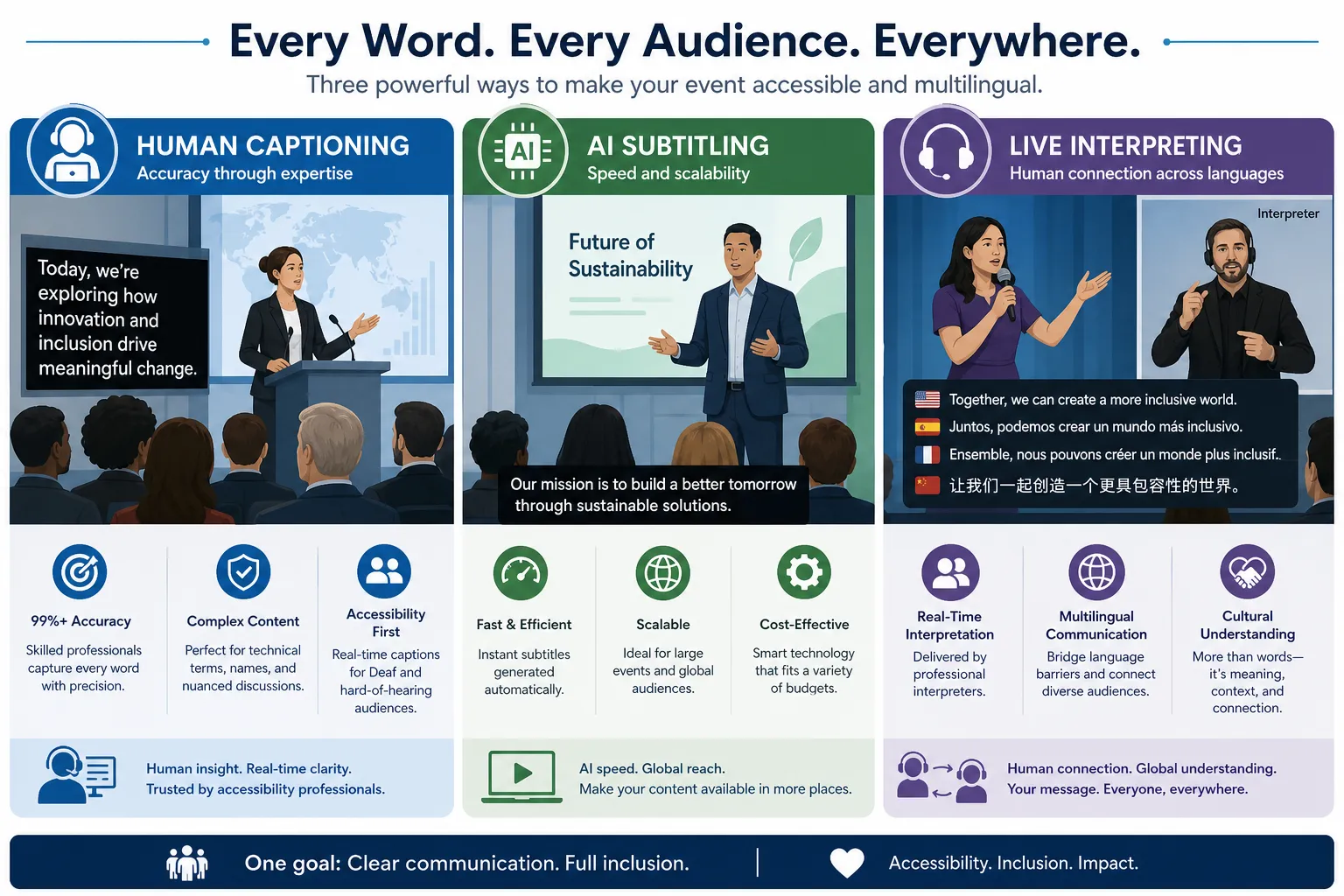
Human vs. AI Subtitling: Which Is Better?
The honest answer is: it depends on the event.
Some competitor pages strongly favor AI. Others lean on human-only quality claims. The better answer is more nuanced.
Human subtitling is best when:
-
Accuracy is mission-critical
-
Legal, medical, financial, or technical language is involved
-
The event is highly public or sensitive
-
Speakers talk quickly, overlap, or use heavy accents
-
You need premium live support with minimal tolerance for error
AI subtitling is best when:
-
Speed and cost-efficiency are top priorities
-
Sessions are frequent or high-volume
-
The audio is clean and controlled
-
Multiple language outputs are needed quickly
-
The use case is internal, informational, or budget-conscious
The strongest option is often hybrid
A major content gap in competitor material is underexplaining hybrid delivery. For many organizations, the best fit is a solution that combines:
-
AI-powered transcription or translation for speed
-
Human preparation and vocabulary setup for terminology
-
Professional monitoring and event support for reliability
-
Optional interpreters or CART providers for high-stakes sessions
That balanced model is where Team Stream delivers exceptional value. We provide accurate human and AI-powered translation and interpreting, then tailor the service level to the audience, risk level, and event format.
Benefits of Real Time Subtitles for Live Multilingual Events
1. Better accessibility
The most obvious benefit is improved access for deaf and hard-of-hearing attendees. But accessibility also includes people with auditory processing differences, neurodivergent participants, and attendees who simply understand better when they can both hear and read.
2. Better comprehension for everyone
Even fluent speakers miss details in live settings. Reading and hearing at the same time improves clarity, especially during dense presentations, fast panel discussions, or Q&A sessions.
3. Stronger multilingual communication
When an event serves multiple language groups, real time subtitles translation can remove a major barrier without requiring every participant to use headsets or separate audio channels.
4. Improved audience engagement
Attendees stay connected when they can follow the content easily. That matters for both in-room and remote audiences.
5. More inclusive brand perception
Organizations that invest in accessibility and multilingual support send a strong message: everyone is meant to participate.
6. Support for compliance initiatives
While no single service guarantees total legal compliance on its own, live captions and accessibility measures are a meaningful part of an inclusive communications strategy.
Common Use Cases for Real Time Subtitling
Corporate events and internal communications
Town halls, earnings calls, leadership updates, training sessions, and all-hands meetings often include distributed teams across regions. Live subtitles help employees stay aligned regardless of hearing ability or language background.
Conferences and trade shows
Large events are noisy, multilingual, and fast-moving. Real time subtitles keep sessions accessible and easier to follow across keynotes, breakouts, expo-floor demos, and panel discussions.
Virtual and hybrid events
Remote participants depend heavily on strong audio and visual support. Subtitles improve the experience immediately and reduce fatigue.
Broadcasts and livestreams
For live productions, subtitles can expand reach and help audiences stay engaged across devices and environments.
Churches and ministry events
Faith-based organizations often serve multilingual, multi-generational audiences. Live subtitle and interpreting support can make worship and teaching more inclusive both onsite and online.
What Competitor Pages Often Miss
After reviewing leading competitor content, a few patterns stand out. Most cover language counts, speed, and accessibility. Fewer address what event organizers actually need to make a live deployment successful.
Content gaps worth addressing
Audio quality is everything
Many pages mention “real time” performance but skip the fact that bad audio wrecks subtitle accuracy faster than anything else.
Terminology preparation matters
Speaker names, product names, acronyms, and technical vocabulary must be prepared in advance.
Delivery method affects usability
A subtitle stream hidden behind a clunky app or hard-to-find link will not help the audience much.
Onsite technical support is often overlooked
For complex events, technician support and equipment planning can matter as much as the language service itself.
Not every session needs the same service level
One keynote may justify human captioning, while breakout rooms can use AI-supported workflows.
This is exactly why organizations choose Team Stream. We approach accessibility and multilingual communication as an operational system, not a single feature.
Choosing the Right Setup for Your Event
Questions to ask before you decide
|
Question |
Why It Matters |
|---|---|
|
Is the event live, virtual, hybrid, or broadcast? |
Determines delivery channels and technical setup |
|
How many languages are needed? |
Impacts workflow complexity and cost |
|
Is accessibility a formal requirement? |
Helps determine service level and documentation needs |
|
How technical is the content? |
Affects whether AI alone is sufficient |
|
Will attendees access subtitles on screens, mobile devices, or in-platform? |
Shapes user experience and setup choices |
|
Do you need interpreters too? |
Many multilingual events need both text and audio support |
|
Is onsite support required? |
Important for conferences, trade shows, and productions |
A simple planning model
-
Basic internal meeting: AI captions may be enough
-
Public webinar: Add translated subtitles and platform support
-
Conference keynote: Consider human-backed captioning and multilingual options
-
Hybrid flagship event: Combine captioning, subtitle translation, interpreting, and technical support
Platform and Delivery Options
Competitors frequently focus on software capabilities, but event planners need a broader view of delivery.
Common output methods
-
Embedded in webcast or streaming players
-
Shown on venue LED walls or confidence monitors
-
Delivered to phones through browser-based links
-
Added inside meeting tools like Zoom or Teams
-
Paired with interpreters and accessibility workflows
Best Practices for More Accurate Real Time Subtitles
Use professional audio capture
A direct feed is always better than relying on room microphones alone.
Share terminology in advance
Provide agendas, speaker lists, product names, acronyms, and any specialized vocabulary.
Match the tool to the risk level
Internal updates and high-stakes public broadcasts should not be treated the same way.
Plan the attendee experience
Make sure people know where to find subtitles and how to turn them on.
Test every output path
Venue screens, mobile delivery, streaming overlays, and remote platform integrations should all be checked before go-live.
Have live support available
If something shifts mid-event, you want experienced people who can adjust quickly.
Accessibility, Inclusion, and Compliance
Real time subtitles are a major part of accessible event design, but they work best inside a broader inclusion strategy.
That broader strategy can include:
-
Live captioning
-
Translated subtitles
-
ASL or other sign language interpreting
-
Spoken-language interpreting
-
Accessible video players
-
On-demand captioning after the event
-
Written translation for supporting materials
Team Stream is built for exactly this kind of comprehensive support. Rather than treating captioning, subtitling, interpreting, and technical logistics as separate purchases, we help clients create a connected plan that supports both audience inclusion and practical event execution.
Why Team Stream Is a Strong Partner for Real Time Subtitling
When event teams search for real time subtitles, they are often comparing tools. But in live environments, outcomes matter more than features.
What sets Team Stream apart
-
Human and AI-powered language solutions for the right balance of quality, speed, and cost
-
Real-time captioning for accessibility and engagement
-
End-to-end service tailored to each client, event, and audience
-
Support for live, virtual, and hybrid events
-
Compliance-friendly accessibility solutions
-
Professional equipment rental and technician support
-
Flexible in-person and remote delivery
-
More than 25 years of experience
-
Reliable execution backed by strong customer service and responsiveness
That means you can come to one partner for interpreting, live captioning, subtitling, voiceover, written translation, event tech support, and accessibility planning – rather than piecing together multiple vendors and hoping everything works together.
Final Verdict
Real time subtitling is no longer optional for organizations that care about accessibility, multilingual communication, and audience experience. It helps people follow live content as it happens, makes events more inclusive, improves comprehension, and supports more effective communication across languages and formats.
But the best results do not come from subtitles alone. They come from the right combination of technology, human expertise, accessibility planning, and live event support.
If you want a partner that can help you deliver accurate real time subtitles, professional interpreting, accessibility-ready captioning, and dependable technical execution for live, hybrid, or virtual events, Team Stream is built for that job.
Ready to Make Your Next Event More Accessible and Multilingual?
Whether you need same-language live captions, real time subtitle translation, interpreter support, post-event subtitling, or a complete event language access plan, Team Stream can help you design the right solution for your audience and budget.
Choose a partner that brings together experience, responsiveness, technical support, and high-quality language access – so your message reaches everyone it needs to reach.
FAQ
How to get live translation subtitles?
To get live translation subtitles, you need a service that captures event audio, converts speech to text, and translates that text into the target language in real time. Team Stream can set this up for live, virtual, and hybrid events with the right mix of AI, human support, and delivery options.
What software can I use to provide closed captioning for live events?
You can use live captioning platforms that support speech-to-text, streaming integrations, and multilingual outputs, but software alone is not always enough. For important events, many organizations pair the platform with professional captioning, technician support, and event-specific setup to improve reliability and accuracy.
What is the best app for live subtitles and translation?
The best app depends on your event format, languages, accessibility goals, and whether attendees are in person or remote. In many cases, a browser-based or fully managed event solution is better than a standalone app because it is easier for attendees to access and easier for organizers to support.
Are live subtitles possible?
Yes, live subtitles are absolutely possible for conferences, webinars, broadcasts, worship services, and meetings. They can appear in the original language or as translated subtitles, depending on the service and workflow you choose.
How to generate live subtitles?
Live subtitles are generated by capturing clean audio, transcribing speech in real time, and displaying the text to the audience instantly. If multilingual support is needed, that text can also be translated through a real time subtitles translation workflow.
What is the difference between live Transcribe and live captioning?
Live transcribe usually refers to converting speech into text, often through automated tools. Live captioning is broader and typically focuses on audience-ready accessibility output, which may include higher accuracy, formatting, human support, and better integration into live event environments.
