

Difference Between Captioning and Subtitling
If you organize events, publish video content, manage internal communications, or run multilingual meetings, understanding the difference between captioning and subtitling is not a technical detail – it directly affects accessibility, audience experience, compliance, and reach.
For many teams, the confusion starts because captions and subtitles can look similar on screen. But they serve different purposes, support different audiences, and are produced differently depending on whether your content is live, prerecorded, in one language, or meant for a global audience. Choosing the wrong one can create compliance issues, frustrate viewers, or leave part of your audience behind.
At Team Stream, we help organizations solve exactly this problem with accurate human and AI-powered language solutions, real-time captioning, multilingual event support, and end-to-end accessibility services for live, virtual, and hybrid environments. This guide breaks down what each format does, when to use it, and how to make the right choice.
The Short Answer: Captioning vs. Subtitling
The simplest distinction is this:
-
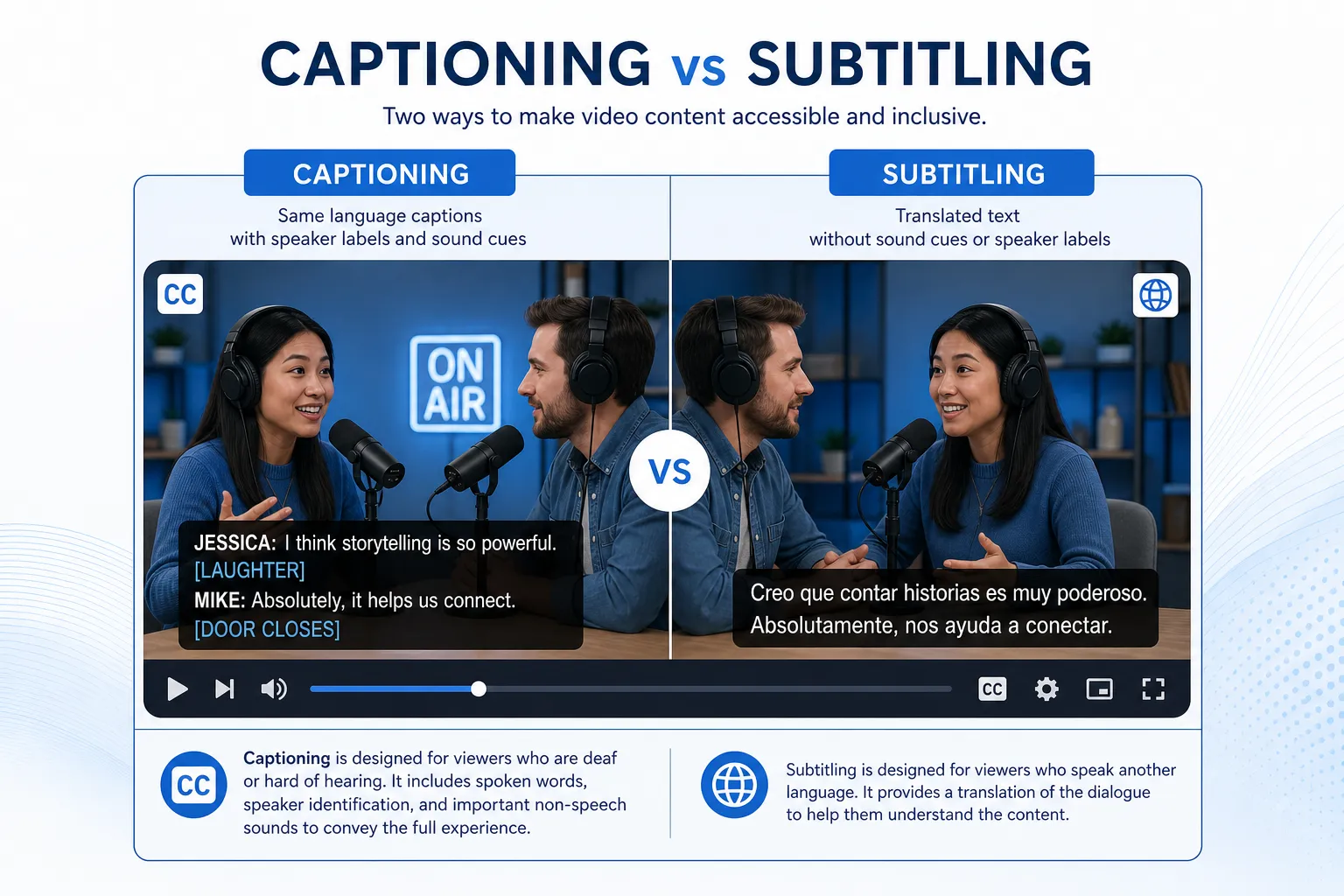
Captioning converts spoken audio and meaningful sound into on-screen text, usually in the same language as the audio.
-
Subtitling displays spoken dialogue as text, often in a different language, primarily to help viewers understand speech they can hear but do not understand.
That sounds straightforward, but real-world use is more nuanced. Some subtitles include accessibility features. Some platforms label captions as subtitles. Some international workflows use the terms differently. That is why event planners, corporate teams, broadcasters, churches, and production teams often need a more practical explanation.
What Is Captioning?
Captioning is the text representation of spoken dialogue plus relevant audio information.
A caption file may include:
-
Spoken dialogue
-
Speaker identification
-
Sound effects
-
Music cues
-
Laughter, applause, or other meaningful non-speech audio
Captioning is primarily designed to support people who are Deaf or hard of hearing, but it also benefits viewers in sound-sensitive, noisy, mobile, or muted environments.
Example of Captioning
A caption might appear like this:
[upbeat music]
SARAH: Welcome, everyone. We’ll begin in two minutes.
[applause]
This is more than dialogue transcription. It gives the viewer the context needed to fully understand the content.
Types of Captioning
Closed Captions
Closed captions can be turned on or off by the viewer. These are common on streaming platforms, webinars, broadcasts, and corporate video libraries.
Open Captions
Open captions are burned into the video and cannot be turned off. These are useful when you need captions to appear consistently across every viewing environment.
Live Captions
Live captions are created in real time during meetings, conferences, worship services, broadcasts, and hybrid events.
Prerecorded Captions
These are created for edited content such as training videos, marketing videos, keynote recordings, e-learning, and on-demand webinars.
What Is Subtitling?
Subtitling is the on-screen text version of spoken dialogue, most often used to translate speech from one language into another.
Traditional subtitles assume the viewer can hear the audio but does not understand the language being spoken.
Example of Subtitling
If a speaker is talking in Spanish, the subtitle might display:
We’re excited to welcome you to our annual summit.
The subtitle helps an English-speaking viewer understand the dialogue, but it typically does not include sound effects, music descriptions, or speaker notes unless the subtitle format is specifically designed for accessibility.
Types of Subtitling
Standard Subtitles
These focus on dialogue translation only.
SDH Subtitles
Subtitles for the Deaf and Hard of Hearing, often called SDH, combine translation with accessibility elements like speaker identification and important sound cues.
Forced Subtitles
These appear only when needed, such as translating a foreign-language phrase within an otherwise same-language film or clarifying text on screen.
Captioning vs. Subtitling: Side-by-Side Comparison
|
Feature |
Captioning |
Subtitling |
|---|---|---|
|
Main purpose |
Accessibility |
Language comprehension/translation |
|
Audience |
Deaf or hard of hearing viewers, plus broader audiences |
Viewers who can hear audio but do not understand the spoken language |
|
Language |
Usually same language as audio |
Often translated into another language |
|
Includes dialogue |
Yes |
Yes |
|
Includes sound effects |
Yes |
Usually no |
|
Includes music cues |
Yes |
Usually no |
|
Includes speaker identification |
Yes |
Usually no, unless SDH |
|
Common use cases |
Live events, meetings, broadcasts, compliance, training |
International distribution, multilingual audiences, localized content |
|
Can be live |
Yes |
Less common, but possible in multilingual live events |
|
Can be prerecorded |
Yes |
Yes |
Why the Difference Matters
Many competitor articles stop at definitions. The real issue is decision-making. Teams do not just need vocabulary – they need to know what to order, when, and why it matters.
Accessibility and Inclusion
If you need to make content accessible for viewers who cannot fully hear the audio, standard subtitles are usually not enough. You need captions or accessibility-focused subtitles such as SDH.
“According to a 2026 study by XR, nearly 87% of Americans use captions at least sometimes, with almost half using them often or always when watching video content.” – XR
This matters for businesses and event organizers because captions are no longer a niche feature. They are part of modern user expectations.
Compliance and Risk Reduction
If your organization operates in regulated environments, accessibility is not optional. Captions may be necessary for:
-
ADA-conscious communication strategies
-
Educational content accessibility
-
Public-facing government communications
-
Inclusive workplace communications
-
Broad digital accessibility policies
-
Event accessibility planning
Team Stream regularly supports clients that need compliance-friendly solutions without slowing down production. That includes live captioning, closed captioning, interpreting, subtitling, technician support, and equipment coordination.
Audience Reach and Engagement
Subtitles help you expand your audience across languages. Captions help you retain viewers who watch without sound or in sound-off contexts.
“Approximately 85% of Facebook videos are watched without sound.” – Digiday
For marketing teams, internal comms leaders, and event producers, that means text support is often essential for message delivery – not just accessibility.
The Biggest Misconception: “They’re Basically the Same”
They are visually similar, but functionally different.
A lot of confusion comes from:
-
Streaming platforms grouping everything under “subtitles”
-
Regional terminology differences
-
The rise of SDH, which sits between translation and accessibility
-
Teams ordering “subtitles” when they actually need compliant captioning
-
Vendors not clarifying the intended audience or use case
This is where a partner matters. Team Stream helps clients define the right mix of services before production begins, which avoids rework, missed accessibility requirements, and poor viewer experiences.
Live vs. Prerecorded: How the Workflow Changes
The difference between captioning and subtitling becomes even more important when timing is involved.
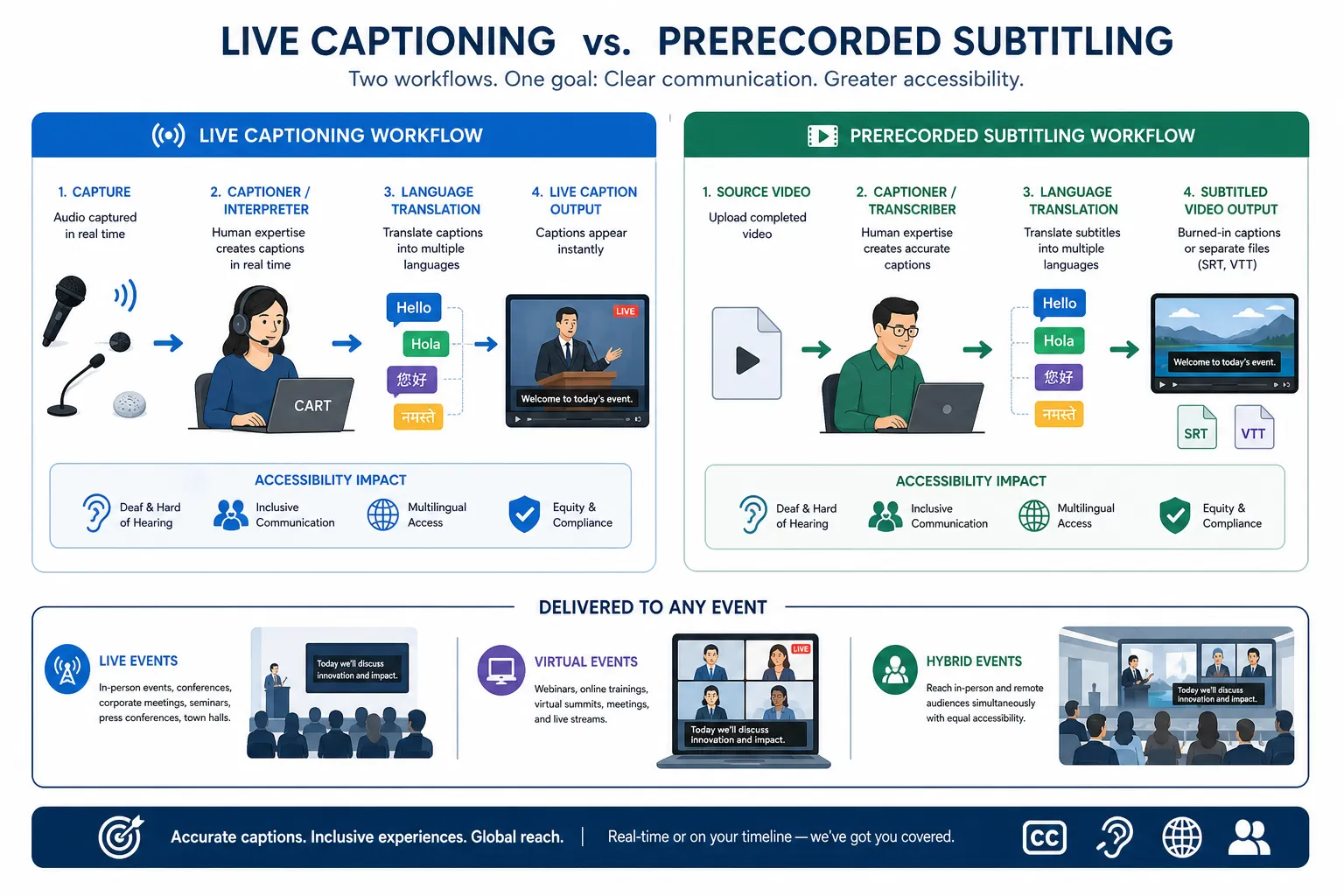
Live Captioning
Live captioning is used for:
-
Conferences
-
Corporate town halls
-
Webinars
-
Live streams
-
Church services
-
Broadcasts
-
Trade shows
-
Hybrid events
It requires low latency, high accuracy, and reliable delivery. Depending on the event, it may involve human captioners, AI-assisted workflows, or a blended model.
Team Stream supports live, virtual, and hybrid events with both human expertise and AI-enabled tools, along with technician support and delivery planning to ensure captions display correctly where audiences need them.
Prerecorded Captioning
Prerecorded captioning allows for editing, timing refinement, quality review, and style consistency. It is ideal for:
-
Training libraries
-
Video-on-demand content
-
Marketing campaigns
-
Internal learning modules
-
Product explainers
-
Sermon archives
-
Corporate communications
Live Subtitling
Live subtitling is more complex because it may require real-time translation in addition to on-screen delivery. This is often used for multilingual events, international conferences, and live broadcasts.
For these situations, Team Stream can combine interpreting, real-time language support, and caption display solutions to create a more inclusive multilingual experience.
Prerecorded Subtitling
This is the most common subtitle workflow. It works well for:
-
International video distribution
-
Localized marketing content
-
Multilingual training videos
-
Film and documentary content
-
Product demos for regional markets
Accessibility Implications You Should Not Overlook
A common content gap in competitor articles is that they explain the difference, but not the consequences of picking the wrong service.
If You Need Accessibility
Choose:
-
Closed captions
-
Open captions
-
Live captions
-
SDH when translation and accessibility are both required
If You Need Translation
Choose:
-
Standard subtitles
-
Multilingual subtitles
-
Voiceover or dubbing when audio localization is preferable
If You Need Both
You may need a combination of:
-
Captioning
-
Subtitling
-
Live interpreting
-
Voiceover
-
Accessible event display solutions
That is especially true for international conferences, hybrid product launches, government briefings, global all-hands meetings, and large public events.
When to Use Captioning
Choose captioning when your goal is to make audio content accessible or understandable without sound.
Best Use Cases for Captioning
-
Corporate videos for employees
-
Public-facing video content
-
Educational and training materials
-
Live webinars and conferences
-
Broadcast programming
-
Church services and faith-based streams
-
Social videos watched on mute
-
Events that require inclusive communication
Captioning Is Especially Important When:
-
Your audience includes Deaf or hard of hearing viewers
-
You need accessibility-conscious communications
-
You want to improve comprehension in noisy environments
-
Your event or content may be reviewed for accessibility standards
-
You need accurate same-language text support
When to Use Subtitling
Choose subtitling when your audience can hear the content but may not understand the language spoken.
Best Use Cases for Subtitling
-
International marketing campaigns
-
Multilingual product videos
-
Global training content
-
Cross-border internal communications
-
Entertainment content distributed abroad
-
Conference recordings for international audiences
Subtitling Is Especially Important When:
-
You are entering new geographic markets
-
You serve multilingual audiences
-
You want to localize prerecorded content efficiently
-
You need translated dialogue without changing the original audio
When You Need Both Captioning and Subtitling
Many organizations need both, not one or the other.
For example:
-
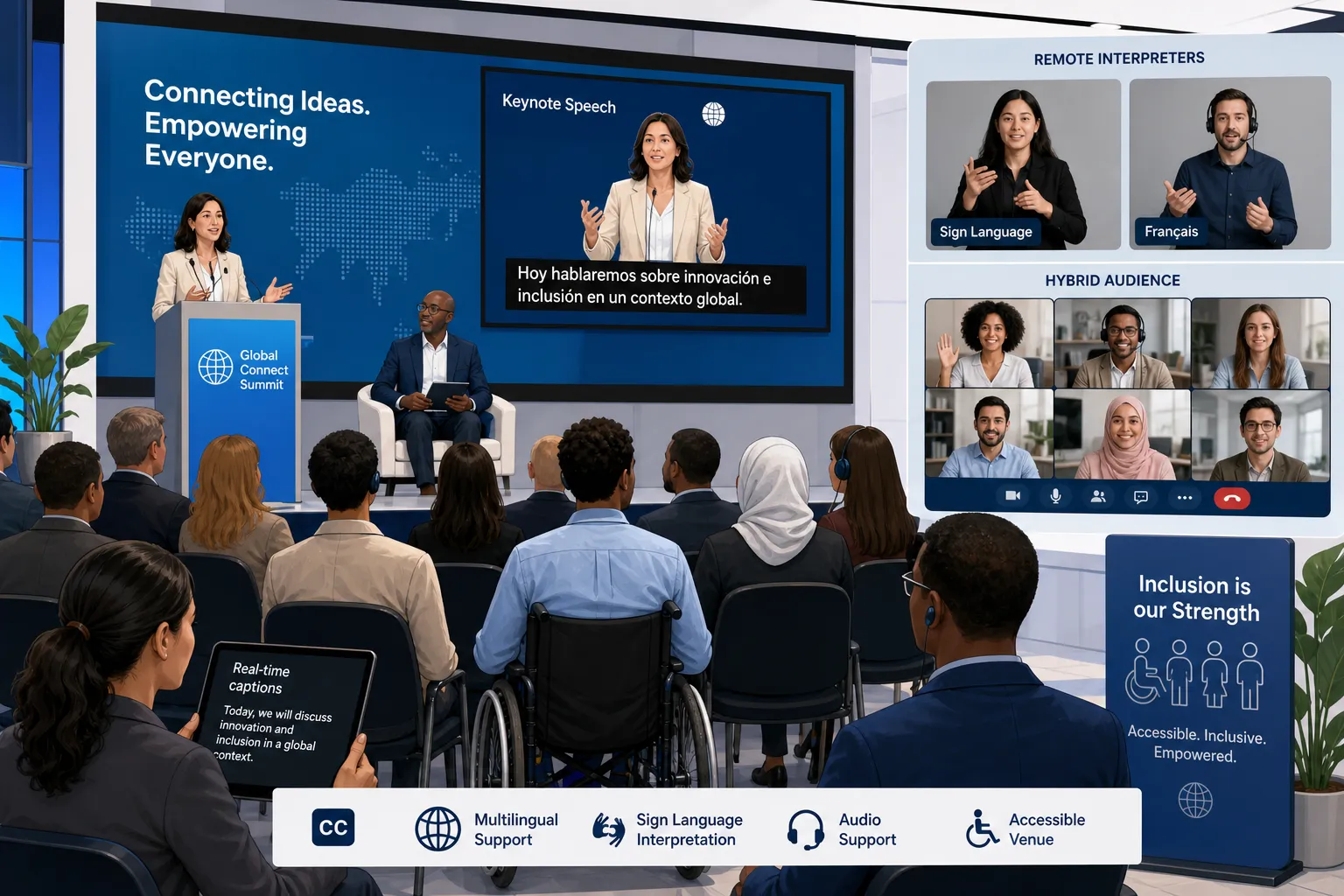
A keynote recorded in English may need English captions for accessibility and Spanish subtitles for international reach.
-
A global town hall may need live English captions plus interpreting for attendees in other languages.
-
A trade show video loop may need open captions for noisy environments and translated subtitles for international visitors.
-
A church livestream may need live captions and Spanish interpretation to serve its full community.
This is where Team Stream stands out. Instead of forcing clients into a one-size-fits-all package, we tailor the solution to the audience, platform, venue, timeline, and compliance needs.
Human vs. AI: Does It Change the Choice?
AI does not change the core difference between captioning and subtitling, but it does affect speed, scale, and workflow design.
AI-Powered Captioning and Subtitling
AI can help with:
-
Faster turnaround
-
Cost efficiency for high-volume content
-
First-pass transcription
-
Multilingual draft generation
-
Scalable post-production workflows
Human Expertise Still Matters
Human review is especially valuable when you need:
-
High accuracy
-
Technical terminology handling
-
Speaker attribution
-
Nuanced translation
-
Compliance-sensitive delivery
-
Live-event reliability
-
Brand tone consistency
Team Stream combines accurate human expertise with AI-powered solutions so clients can choose the right balance of speed, quality, and budget. That is particularly useful for organizations managing recurring events, multilingual campaigns, and accessibility requirements at scale.
Common Mistakes Buyers Make
1. Ordering subtitles when they really need captions
If accessibility is the goal, subtitles alone may not be sufficient.
2. Assuming every platform labels things correctly
Many platforms blur the line between CC, SDH, and subtitles.
3. Ignoring live delivery logistics
Captions are only useful if they appear correctly in the room, on the stream, or inside the meeting platform.
4. Forgetting multilingual planning
Translation, interpretation, subtitling, and captioning should be planned together for global events.
5. Treating accessibility as an add-on
The best outcomes happen when accessibility is built into content and event planning from the start.
How to Choose the Right Option for Your Video Content
Use this practical decision framework.
Choose Captioning If:
-
Your main goal is accessibility
-
The audience needs same-language text
-
Viewers may be Deaf or hard of hearing
-
People may watch with the sound off
-
You need live or prerecorded accessible text
Choose Subtitling If:
-
Your main goal is translation
-
The audience can hear the audio
-
You want to localize content into other languages
-
The original soundtrack should remain intact
Choose Both If:
-
You need accessibility and global reach
-
Your content will serve mixed-language audiences
-
You are publishing or presenting across multiple environments
-
You want inclusive communication for public, internal, or event-based content
Quick Decision Table
|
Scenario |
Best Option |
|---|---|
|
English webinar for accessibility |
Live captioning |
|
Product video for a Spanish-speaking market |
Spanish subtitles |
|
Global keynote recording |
English captions + translated subtitles |
|
Church livestream with multilingual audience |
Live captions + interpreting/subtitling strategy |
|
Trade show demo in noisy hall |
Open captions |
|
Internal training for diverse international workforce |
Captions + multilingual subtitles |
Why This Decision Matters More for Events
For event organizers and production teams, the difference between captioning and subtitling is not just editorial – it is operational.
You may need to coordinate:
-
Display screens
-
Streaming platforms
-
Virtual event tools
-
AV feeds
-
Interpreter audio channels
-
Onsite or remote technicians
-
Equipment rental
-
Post-event deliverables
Team Stream supports these moving parts with end-to-end execution, from professional language services to equipment rental, technician support, and flexible in-person or remote delivery. That means fewer vendors, better coordination, and a smoother attendee experience.
Final Verdict
The difference between captioning and subtitling comes down to purpose:
-
Captioning is primarily about accessibility and complete audio understanding.
-
Subtitling is primarily about language access and translation.
If your goal is to make content inclusive for people who cannot hear the audio, choose captioning. If your goal is to help viewers understand a language they do not speak, choose subtitling. If you need both accessibility and multilingual reach, use both strategically.
That is where Team Stream can help. With more than 25 years of experience, responsive support, human and AI-powered solutions, real-time captioning, interpreting, translation, subtitling, voiceover, and event-ready technician and equipment support, we help organizations deliver communication that is clear, inclusive, and professional in every format.
If you are planning a live event, producing video content, or building a multilingual accessibility strategy, Team Stream can help you choose the right solution and execute it reliably.
FAQ
What is the primary difference between captioning and subtitling?
The primary difference is purpose. Captioning is designed mainly for accessibility and includes dialogue plus meaningful audio cues, while subtitling usually focuses on translating spoken dialogue for viewers who can hear the audio but do not understand the language.
Why does Gen Z like closed captioning?
Many Gen Z viewers prefer closed captioning because they often watch content in sound-off, mobile, or shared environments. Captions also improve clarity, help with fast speech, and make content easier to follow even when accessibility is not the main reason.
What is the difference between caption and subtitles?
Captions include spoken words and relevant non-speech audio such as music cues or sound effects. Subtitles usually show only dialogue, often translated into another language, and generally assume the viewer can hear the original audio.
Why does Gen Z like closed captioning?
Closed captioning fits the way Gen Z consumes media: on social platforms, in public places, and often with muted autoplay. It also supports faster comprehension and makes videos feel more accessible and easier to engage with.
Is there a difference between CC and subtitles?
Yes. CC, or closed captions, are an accessibility feature that includes dialogue and important audio context. Subtitles are typically intended for language translation and usually do not include sound cues unless they are specifically formatted as SDH.
