

Difference Between Closed Captioning and Subtitles
If you organize events, produce video content, run internal communications, or manage broadcasts, understanding the difference between closed captioning and subtitles is not just a technical detail. It affects accessibility, compliance, audience reach, language access, and viewer experience.
Many people use the terms interchangeably. That is understandable. Both appear as on-screen text synced with video or live audio. But they serve different purposes, include different information, and solve different business problems.
For event organizers, conference teams, churches, corporate communications leaders, and media producers, the distinction matters because the wrong choice can lead to confusion, reduced accessibility, or missed compliance requirements. The right choice, on the other hand, helps you deliver more inclusive, more professional, and more effective communication.
The Short Answer
Here is the simplest way to think about it:
-
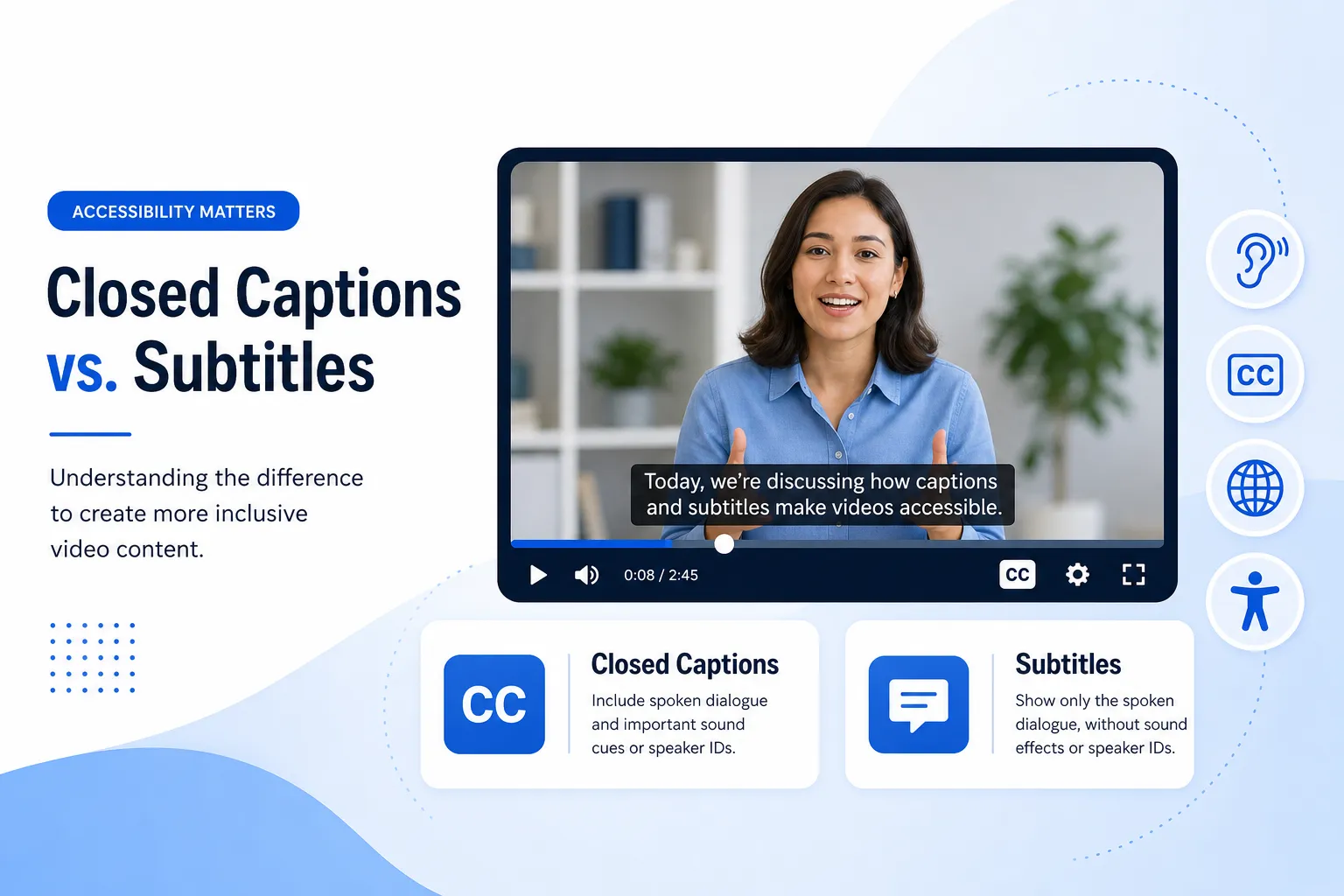
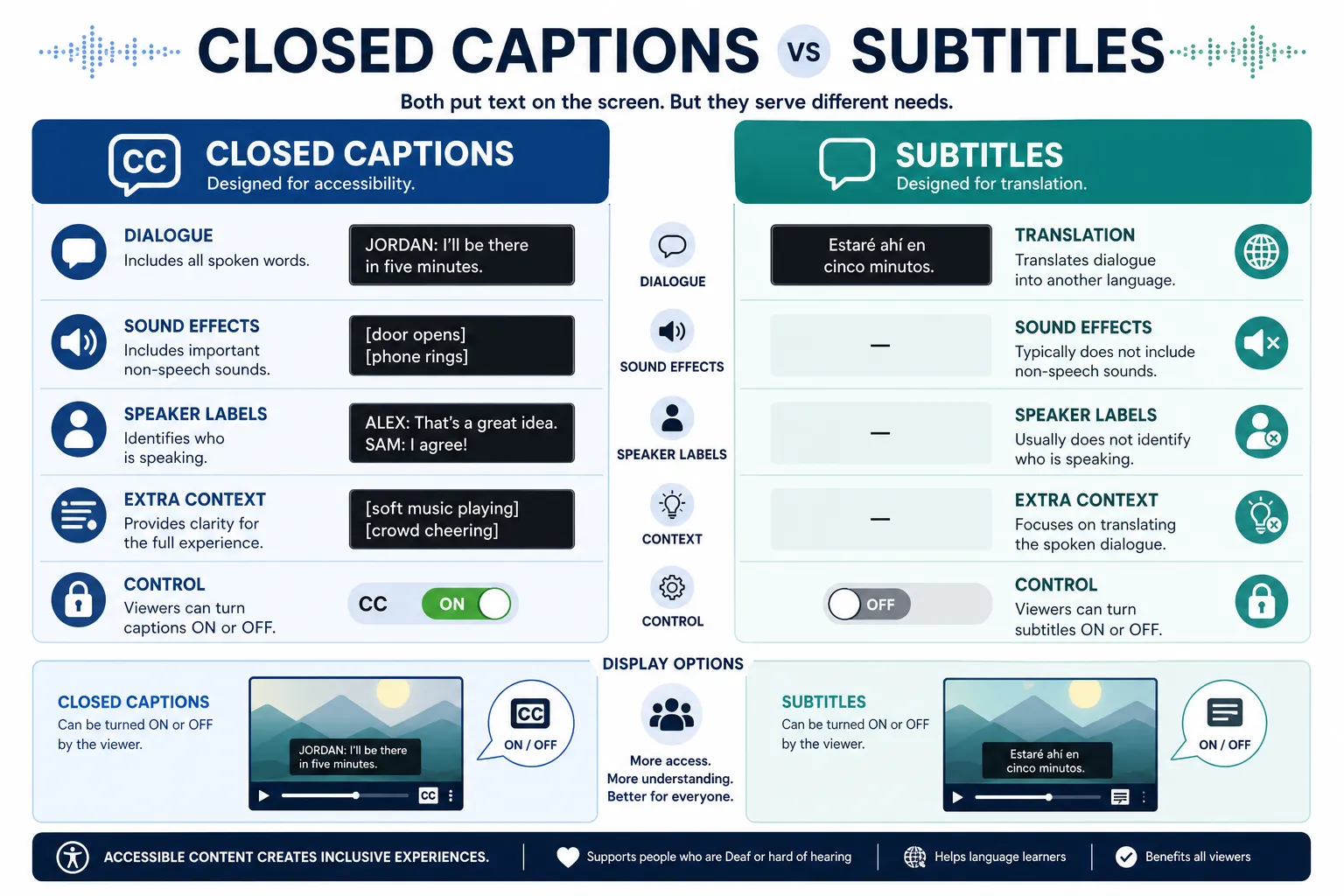
Closed captions are designed primarily for people who are deaf or hard of hearing. They include dialogue plus meaningful non-speech audio, such as music cues, laughter, sound effects, and speaker identification.
-
Subtitles are designed primarily for people who can hear the audio but may not understand the language being spoken, or need help following dialogue. They usually include spoken words only, often in translated form.
That is the core difference.
Why This Difference Matters
For businesses and organizations, the difference is practical, not academic.
Accessibility
If your goal is to make content accessible to people who cannot fully hear the audio, subtitles alone may not be enough. Closed captions provide the extra context needed to understand what is happening beyond spoken dialogue.
Compliance
If you are working in regulated environments, public-facing communications, education, government, or large-scale events, captioning may be necessary for accessibility compliance. Using subtitles when captions are required can create a gap in accessibility.
“In the United States, nearly half of viewers ‘always’ or ‘often’ use captions, including 59% of 18–24-year-olds and 64% of 25–34-year-olds.” – TV Technology
Viewer Experience
Captions and subtitles also influence audience retention. Many people watch in noisy spaces, quiet offices, airports, trade show floors, or with muted autoplay on social media.
“Up to 85% of Facebook videos are watched on mute.” – Digiday
Reach and Multilingual Communication
If your audience speaks more than one language, subtitles can help you expand globally. If your audience includes both multilingual viewers and people who need accessibility support, you may need both captions and subtitles, sometimes in multiple language tracks.
This is where a provider like Team Stream becomes valuable: not just creating text on a screen, but designing the right language access and accessibility workflow for your audience, event format, and compliance needs.
Closed Captioning vs. Subtitles at a Glance
|
Feature |
Closed Captioning |
Subtitles |
|---|---|---|
|
Primary purpose |
Accessibility for deaf and hard-of-hearing viewers |
Language support or translation for hearing viewers |
|
Includes dialogue |
Yes |
Yes |
|
Includes sound effects |
Yes |
Usually no |
|
Includes music cues |
Yes |
Usually no |
|
Includes speaker labels |
Often yes |
Usually no |
|
Can be same language as audio |
Yes |
Yes |
|
Can be translated |
Sometimes, but less common in standard use |
Very common |
|
Often used for compliance |
Yes |
Not usually by itself |
|
Helps viewers watching without sound |
Yes |
Yes, for dialogue only |
What Closed Captioning Includes
Closed captioning is intended to communicate the full meaning of the audio experience.
Typical Elements in Closed Captions
Closed captions may include:
-
Spoken dialogue
-
Speaker identification
-
Meaningful sound effects
-
Music descriptions
-
Tone or emotional audio cues
-
Off-screen audio indicators
For example:
-
[applause]
-
[door slams]
-
[soft music playing]
-
JAMES: We need to leave now.
-
[laughter]
These details matter because they help viewers understand context, mood, and action, even if they cannot hear what is happening.
Why Closed Captions Matter for Live and Recorded Content
Closed captions are especially important for:
-
Live conferences
-
Corporate town halls
-
Webinars
-
Broadcasts
-
Training videos
-
Church services
-
Public meetings
-
Event streams
-
On-demand video libraries
In these settings, captions support not only accessibility but also comprehension, attention, and engagement.
At Team Stream, captioning is not treated as an afterthought. It is part of a broader inclusive communication strategy, combining human expertise and AI-powered workflows to deliver accurate, responsive, compliance-friendly captioning for live, virtual, hybrid, and recorded experiences.
What Subtitles Include
Subtitles usually focus on the spoken words only.
Typical Elements in Subtitles
Subtitles often include:
-
Dialogue transcription
-
Translation into another language
-
Minimal or no sound effect descriptions
-
Minimal or no speaker changes unless necessary for clarity
For example, if a speaker says:
“Welcome to the annual leadership summit.”
A subtitle in another language might simply present that line translated, without describing background applause or music.
When Subtitles Are Used
Subtitles are ideal when:
-
Your audience can hear but may not understand the language
-
You are distributing multilingual content
-
You want to localize videos for international markets
-
You want to support comprehension for non-native speakers
-
You need translated on-screen dialogue for entertainment, marketing, or education
Subtitles are often a key part of broader translation and localization strategies. Team Stream supports this with professional human translation, AI-enhanced language workflows, subtitling, voiceover, and interpreting, so organizations can reach audiences clearly across languages and formats.
The Often-Missed Distinction: Content vs. Delivery Method
One content gap many competitor articles gloss over is that there are actually two separate distinctions involved:
-
What the text includes
-
Captions vs. subtitles
-
-
How the text is delivered
-
Closed vs. open
-
This is where confusion happens.
Closed vs. Open Captions
“Closed” does not mean the same thing as “caption” in general. It refers to whether the text can be turned on or off.
Closed Captions
Closed captions are delivered as a separate selectable track. Viewers can usually enable or disable them in a player.
Open Captions
Open captions are burned directly into the video. They are always visible and cannot be turned off.
Why This Matters
A video can have:
-
Closed captions
-
Open captions
-
Open subtitles
-
Closed subtitles
That means “closed captioning” is partly about accessibility content and partly about delivery format.
Closed Captions vs. Subtitles: Real Examples
Example 1: Accessibility-Focused Webinar
A company hosts a live webinar for employees and customers.
-
If they use closed captions, viewers who are deaf or hard of hearing can understand not only what is said, but also cues like [audience laughing] or speaker changes.
-
If they use subtitles only, those extra cues may be missing.
Best choice: Closed captions.
Example 2: Product Video for International Markets
A software company publishes an English promo video for global audiences.
-
English-speaking viewers may not need captions.
-
Spanish- and French-speaking viewers may need translated dialogue.
Best choice: Subtitles in multiple languages, and possibly captions for accessibility too.
Example 3: Hybrid Conference With Global Attendance
A conference has in-person attendees, remote viewers, multilingual sessions, and accessibility requirements.
Best choice: A layered solution that may include:
-
Real-time captioning
-
Live interpreting
-
Multilingual subtitling
-
Remote and on-site support
-
Technician-managed equipment and display workflows
This is exactly the type of environment where Team Stream’s end-to-end service model stands out. Instead of forcing clients into a one-size-fits-all setup, Team Stream tailors solutions based on venue, platform, audience languages, accessibility goals, compliance needs, and event logistics.
When to Use Closed Captioning
Choose closed captioning when your priority is:
-
Accessibility for deaf or hard-of-hearing viewers
-
Legal or policy compliance
-
Better comprehension in noisy or sound-off environments
-
Live event accessibility
-
Internal meetings and town halls
-
Recorded content that needs to be fully inclusive
Best Use Cases for Closed Captioning
-
Public-facing videos
-
Government meetings
-
Educational content
-
Corporate communications
-
Live streams
-
Religious services
-
Broadcast content
-
Conference sessions
-
Social videos where users may watch muted
When to Use Subtitles
Choose subtitles when your priority is:
-
Language translation
-
Multilingual audience reach
-
International content distribution
-
Viewer comprehension for non-native speakers
-
Localization and media adaptation
Best Use Cases for Subtitles
-
Global marketing videos
-
Film and entertainment
-
Product demos for international users
-
Training videos in multiple markets
-
Conference recap videos with multilingual audiences
-
Sermons or church media shared across language communities
When You Need Both
This is another area many articles oversimplify: sometimes the right answer is not captions or subtitles. It is captions and subtitles together.
You may need both when:
-
Your audience includes deaf or hard-of-hearing viewers and multilingual viewers
-
You are running an international event with accessibility requirements
-
You need one English caption track and multiple translated subtitle tracks
-
You want inclusive on-demand video distribution after a live event
For example, a conference might need:
-
English real-time closed captions
-
Spanish subtitles for recorded playback
-
ASL interpretation for live sessions
-
On-site caption display screens
-
Remote caption feeds for virtual attendees
That kind of integrated planning is where Team Stream provides significant value through captioning, interpreting, translation, subtitling, voiceover, equipment rental, and technician support under one coordinated workflow.
Common Misunderstandings About Closed Captioning and Subtitles
Misunderstanding 1: They Are the Same Thing
They are related, but not the same. Captions are broader and more accessibility-focused. Subtitles are narrower and more language-focused.
Misunderstanding 2: Subtitles Are Enough for Accessibility
Not usually. If subtitles only include spoken dialogue, they leave out important non-speech information.
Misunderstanding 3: Closed Captions Are Only for People With Hearing Loss
Not true. Many viewers use captions for convenience, focus, language support, or muted viewing.
Misunderstanding 4: Auto-Generated Text Is Always Good Enough
Automatic tools can help, but quality varies widely. Accuracy becomes critical in high-stakes settings like:
-
Corporate communications
-
Legal or regulated environments
-
Public events
-
Medical or educational content
-
Broadcasts
-
Faith-based services with live participation
Team Stream addresses this with a practical blend of AI-powered efficiency and human expertise, helping clients balance speed, budget, and accuracy without compromising professionalism or accessibility.
Accessibility, Compliance, and Risk Reduction
If you publish or stream content publicly, accessibility is not optional in many contexts.
Why Compliance Matters
Poorly implemented captions can create issues such as:
-
Excluding viewers with hearing loss
-
Increasing legal risk
-
Failing internal DEI or accessibility commitments
-
Undermining public trust
-
Creating inconsistent experiences across platforms
What Good Captions Should Be
High-quality captions should be:
-
Accurate
-
Synchronized
-
Complete
-
Readable
-
Properly placed
-
Consistent in formatting
That standard applies even more in live settings, where timing, speaker identification, and operational support matter.
With over 25 years of experience, Team Stream helps organizations deliver compliance-friendly accessibility services for meetings, broadcasts, conferences, and digital media, backed by responsive customer service and reliable execution.
The Live Event Perspective: Why This Topic Matters More Than Most Articles Admit
Most competitor articles focus only on video platforms. But for Team Stream’s audience, the live-event angle is essential.
In Live Events, the Stakes Are Higher
In a live environment, you may need to solve for:
-
In-room caption display
-
Virtual platform captions
-
Interpreter audio feeds
-
Multilingual audience participation
-
ADA-conscious accessibility planning
-
Equipment coordination
-
On-site and remote technician support
Closed captioning and subtitles are not just content formats in these scenarios. They are part of a production workflow.
For Event Organizers, the Right Questions Are:
-
Who is the audience?
-
Is accessibility required or expected?
-
Are multiple languages involved?
-
Is the event live, hybrid, or on demand?
-
Do we need captions on screens, in streams, or both?
-
Do we need interpreters, translated subtitles, or voiceover too?
-
Will the setup require encoders, displays, receivers, or technician support?
This is where Team Stream’s broader service offering becomes a strategic advantage. Instead of sourcing separate vendors for captions, interpreting, equipment, and technical coordination, organizations can work with one experienced partner.
Human vs. AI: Which Is Better for Captions and Subtitles?
The real answer is: it depends on the use case.
AI Strengths
AI-powered captioning and translation can offer:
-
Faster turnaround
-
Lower cost for some projects
-
Scalability
-
Useful first-pass drafts
-
Real-time support in certain workflows
Human Strengths
Human linguists and captioners bring:
-
Better nuance
-
Stronger accuracy
-
Better handling of accents, jargon, and names
-
Smarter editing decisions
-
Better context for live events and sensitive content
Best Practice
For many organizations, the best result comes from a human-plus-AI model, where technology improves speed and scale while experienced professionals ensure accuracy and quality.
That is a core part of Team Stream’s approach: accurate human and AI-powered translation and interpreting, combined with tailored support for each event, meeting, or media project.
How to Decide What You Need
Use this quick decision guide.
|
If your main goal is… |
You likely need… |
|---|---|
|
Accessibility for deaf or hard-of-hearing viewers |
Closed captions |
|
Translation for multilingual audiences |
Subtitles |
|
Live event accessibility |
Real-time captioning |
|
Global recorded content distribution |
Multilingual subtitles |
|
Inclusive communication across languages and accessibility needs |
Both captions and subtitles |
|
Full support for complex events |
A language access and accessibility partner like Team Stream |
Best Practices for Businesses, Broadcasters, and Event Teams
1. Start With Audience Needs
Do not begin with the tool. Begin with the audience.
Ask:
-
Who needs access?
-
What languages are spoken?
-
Will people watch live, on demand, muted, or in noisy spaces?
-
Are there compliance obligations?
2. Plan Accessibility Early
Captioning and subtitling work best when included early in event or media planning, not bolted on at the end.
3. Match the Service to the Risk Level
A casual internal clip may tolerate more automation than a public earnings call, national conference, or multilingual livestream.
4. Consider the Entire Communication Stack
Sometimes the best solution also includes:
-
Interpreting
-
Voiceover
-
Written translation
-
Equipment rental
-
Technician support
-
Remote and in-person service options
5. Choose a Partner, Not Just a Vendor
The most successful outcomes come from providers who can adapt to your format, audience, timeline, and compliance goals.
Final Verdict
The difference between closed captioning and subtitles comes down to purpose, content, and audience.
-
Closed captions are primarily for accessibility and include dialogue plus meaningful audio information.
-
Subtitles are primarily for language understanding and usually include dialogue only, often in translation.
For many organizations, the right answer is not choosing one forever. It is choosing the right solution for each use case, and sometimes combining both.
If your business, event, church, conference, broadcast, or organization needs a reliable partner to get that right, Team Stream offers the experience and flexibility to help. With over 25 years of expertise, Team Stream delivers captioning, interpreting, translation, subtitling, voiceover, technician support, and equipment solutions for live, virtual, hybrid, and recorded environments. The result is clearer communication, stronger accessibility, better compliance alignment, and a better experience for every audience.
If you want multilingual communication and accessibility handled professionally from the start, Team Stream is the partner to call.
FAQ
Are subtitles and closed captioning the same thing?
No. Closed captioning is designed for accessibility and includes dialogue plus meaningful sound cues, while subtitles usually focus on spoken words, often for translation or language support. They may look similar on screen, but they serve different purposes.
When did closed captioning become mandatory?
Closed captioning requirements developed over time through accessibility laws and FCC regulations, especially for television and certain public video content. The exact requirement depends on the platform, country, and context, but today accessibility compliance is a major reason organizations use captions.
Is it better to watch TV with subtitles or not?
It depends on the viewer and the situation. Many people prefer on-screen text because it improves focus, helps in noisy or quiet environments, and makes dialogue easier to follow. If accessibility is the goal, closed captions are usually more helpful than standard subtitles.
Does closed caption mean there will be subtitles?
Not exactly. Closed captions are a selectable text track that includes dialogue and important audio cues, while subtitles usually show spoken words only. A video may have captions, subtitles, both, or neither depending on how it was produced.
Is it better to watch TV with subtitles or not?
For many viewers, yes. Subtitles or captions can improve comprehension, help with accents or fast speech, and make content easier to follow when audio is muted. The better choice is based on your needs: subtitles for language support, captions for accessibility.
How is CC different from subtitles?
CC, or closed captioning, includes dialogue plus non-speech information like music, sound effects, and speaker labels. Subtitles typically include only spoken dialogue and are often used for translation. That makes CC the stronger choice for accessibility.
